
“AI agent,” “automation,” “automation with AI”: in conversations about AI implementations these three terms are used interchangeably. But they are three different things, with different build costs, different levels of complexity and completely different uses. For the person who decides on the budget, a CIO, a CFO, a board member, confusing them has a very concrete price: either you overpay by building an advanced agent where simple automation would do, or the implementation does not work because you are trying to solve a problem that requires understanding language with rigid rules.
This article sorts out the three terms from an advisory perspective, not a technical one, and gives a simple frame: when to deploy which. No jargon, and no assumption that you read developer documentation.
Why Polish companies confuse AI agents with automation
The confusion comes from nowhere in particular and from nobody's ignorance. It comes from marketing and from using the terms interchangeably. Almost everything is now called “AI” or “agentic,” so the boundaries between the terms have blurred.
Myth 1: “Every automation is AI now.” Not true. The vast majority of valuable automations in companies are deterministic rules, “if an invoice arrives, post it here,” that use no language model at all. They work great and do not need AI to deliver savings.
Myth 2: “An AI agent is just a better chatbot.” Also no. A chatbot answers. An agent acts: it plans steps, uses tools and data, makes decisions and handles a situation that cannot be described in advance with a rule. The difference is the same as between a coffee machine and a barista.
Myth 3: “Since it is AI, it will build itself and learn on its own.” The most expensive myth. Both an agent and an automation are solutions that have to be designed, deployed and maintained. Nothing happens on its own, and the cost of maintenance is often higher than the cost of building.
Why does this matter for a decision maker? Because three things depend on this distinction at once: how much you will pay, what risk you take on, and whether you pick the right tool for the problem at all. In an extreme case, the same business need can cost a few thousand PLN (simple automation) or a few hundred thousand PLN (an elaborate agent), and the difference comes solely from the accuracy of the diagnosis, not from the quality of execution.
What an AI agent is
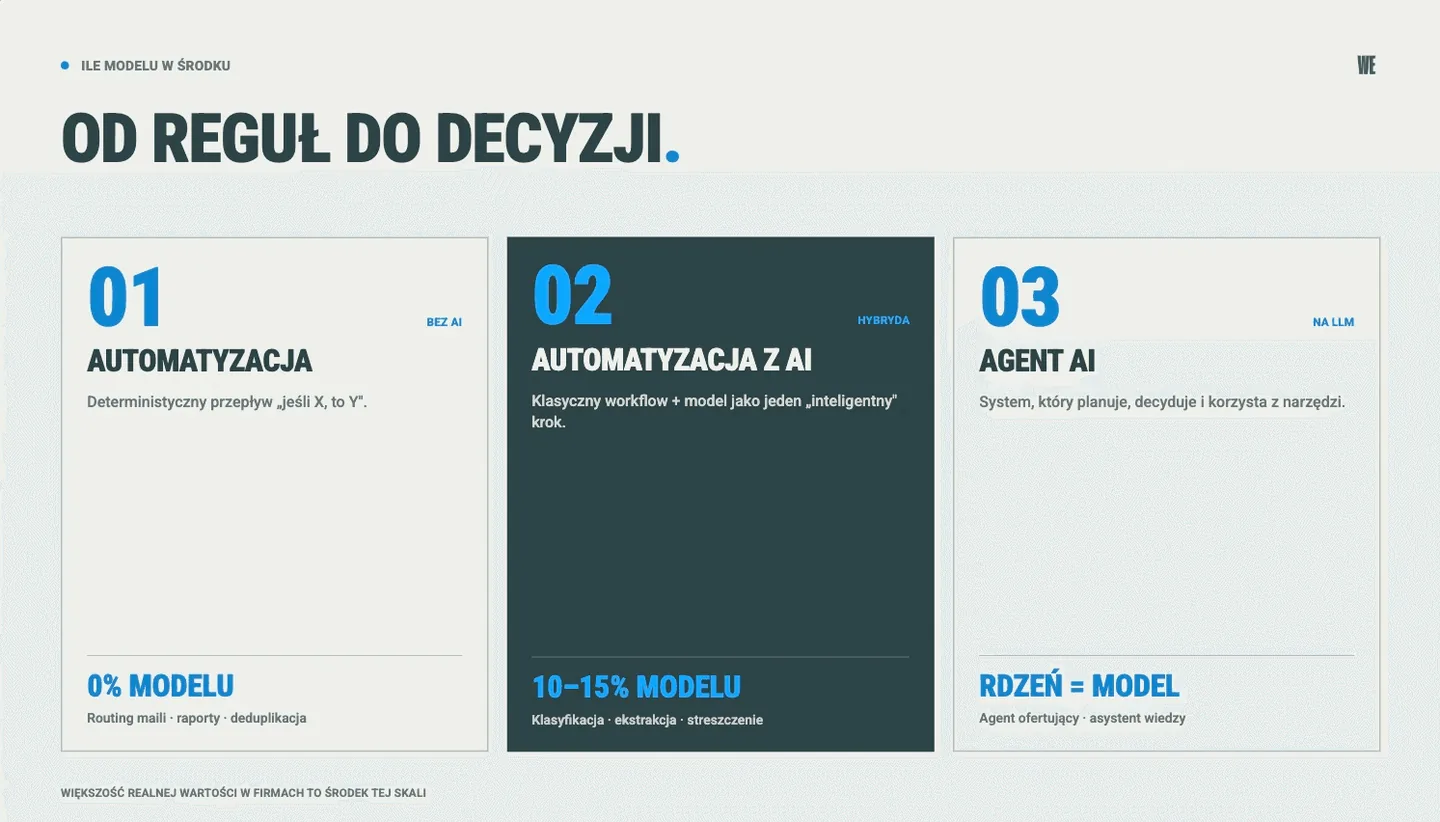
An AI agent is a system based on a large language model (LLM) that makes decisions and carries out tasks, rather than only generating text. It works in a loop: it receives a goal, plans steps, reaches for tools and data, evaluates the result and, if needed, corrects course. Its strength is handling ambiguity: it understands natural language, interprets intent and handles cases that nobody foresaw in a rigid scenario.
Typical uses we deploy: a quoting agent (prepares a configuration and a price from a customer inquiry), a knowledge assistant (answers questions based on company documentation), an agent that handles tickets. What matters: an agent is a custom-built solution that is built and deployed in the context of a specific company, not an off-the-shelf product that you “buy and switch on.”
In practice an agent works in a loop: it receives a goal (“prepare a quote for this request”), breaks it into steps, pulls data from systems, makes decisions and checks the result before handing it over. The boundary is simple: if the task can be written as a rigid “step 1, step 2, step 3” scenario and there are never exceptions to it, you do not need an agent, automation is enough. An agent earns its keep only where exceptions and ambiguity are the rule, not the exception.
What process automation is
Process automation is a deterministic, rule-based workflow: “if X, then do Y.” It is built in tools such as n8n, Make, Power Automate or Microsoft Copilot Studio. It is predictable, cheap to maintain and, crucially, does not need a language model to work.
Classic examples: moving data between systems, generating documents from a template, validating and completing records, notifications, recurring reports. It is often the fastest route to the first measurable savings, and for many processes it is entirely sufficient. Not every problem requires AI; some simply require solid automation. In most companies it is automation, not a flashy agent, that accounts for the lion’s share of recovered time, because there are simply more repetitive, rule-based tasks than anything else.
What “automation with AI” is - how to recognize it
Between the two worlds above lies the most common type of implementation in practice: automation with AI. It is a workflow in which a language model plays the role of one of the functions, for example it classifies an incoming document, extracts data from it or summarizes its content, but 85-90% of the logic is still classic, deterministic automation.
There is a simple test to recognize it: imagine removing the language model from the process. If the process mostly keeps working, and the model added only one “intelligent” step, it is automation with AI, not an agent. If the whole process falls apart without the model, because the model was making the decisions, it is an agent.
This type of implementation is usually the most cost-effective: it adds intelligence exactly where it is needed, without the cost and risk of a full agent. A real-life example: a workflow that receives hundreds of emails a day uses the model only to recognize what each one is about, and everything else (assignment, logging, notification) is done by classic automation. One “intelligent” step, big savings, minimal risk.
Four examples from our practice
The theory is simple. I will show four implementations, one for each case. One of them may surprise you.
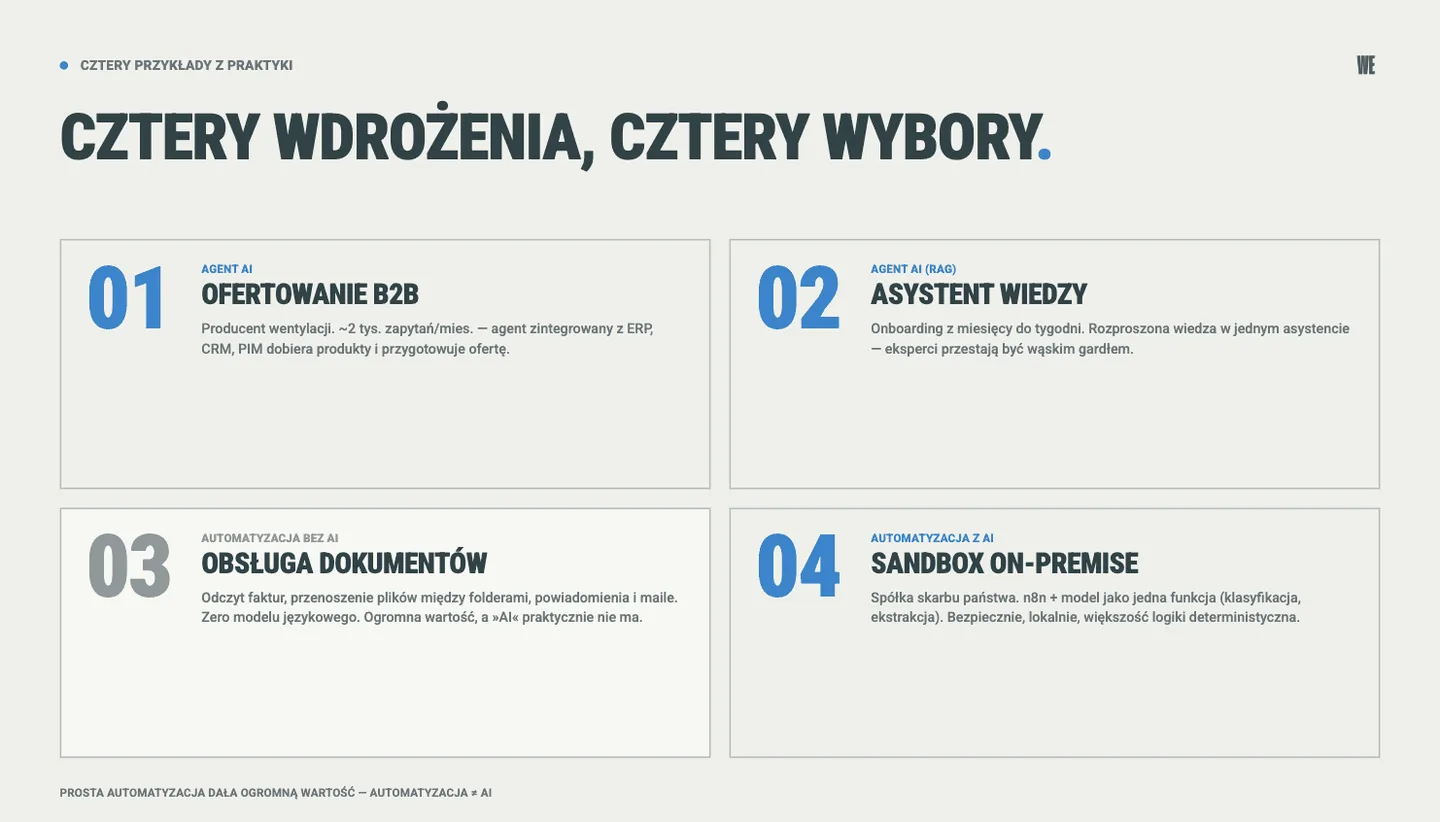
AI agent: B2B quoting
A Polish manufacturing company. The entire process of handling requests for quotation (about 2 thousand a month) is run by an AI agent integrated with the ERP, CRM, knowledge base and product data (PIM). The agent interprets the request, selects products and configuration and prepares the quote, and the repetitive, time-consuming part of handling requests no longer requires manual work. This is an agent, because it is the one making decisions and using tools, not a person carrying out steps one by one.
AI agent: knowledge assistant
In a company with extensive product and procedural knowledge, onboarding new employees took months, because the knowledge was scattered across documents, systems and the heads of experienced employees. A knowledge assistant based on RAG (it answers questions based on company documentation) cut the ramp-up of new people to weeks, and experienced employees stopped being a bottleneck for the whole team. This is an agent, because it understands a question asked in natural language, reaches for the right sources and synthesizes an answer, instead of pointing to a thirty-page document.
Automation WITHOUT AI: documents, folders and notifications
Here is the surprise. At one company we automated the handling of incoming documents: reading data from invoices, sorting and moving files between folders, completing records, and automatic notifications and email sending. It is entirely rules and a deterministic flow, with no language model and no decisions made by a model. The business value is huge, and there was practically no “AI” in the project. It is the best illustration that automation and AI are not synonyms: a large part of the real savings in companies comes from plain, well-designed automation. If someone had told this team to “implement AI,” they would have started by looking for a use for a model and skipped the simplest, cheapest and most effective solution that was already sitting on the table.
Automation WITH AI: a private on-premise sandbox
At a financial company we set up a secure, on-premise sandbox in which n8n automations use language models as one of the functions of a workflow, for example for classification or data extraction. The model is a component of the process here, not an autonomous agent. A classic example of “automation with AI”: most of the logic is deterministic, and the LLM adds intelligence at the points where it makes sense.
When to deploy which - a decision frame
Instead of asking “do we need AI?”, ask about the nature of the problem. This frame leads to the right choice.
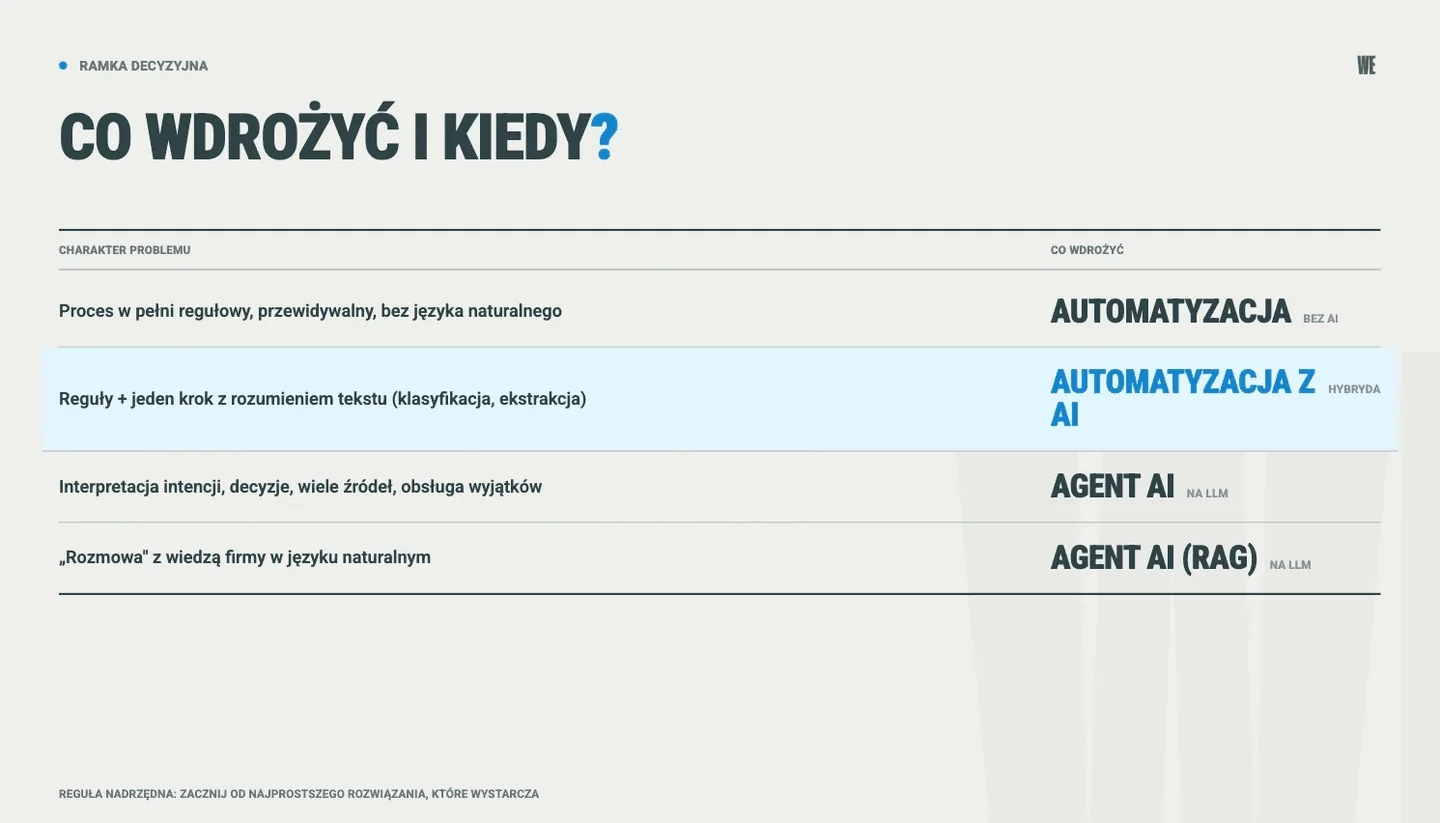
Nature of the problem | What to deploy |
|---|---|
A fully rule-based, predictable process, no natural language | Automation (no AI) |
A rule-based process with one step that requires understanding text (classification, extraction, summary) | Automation with AI |
The task requires interpreting intent, making decisions, using multiple sources and handling exceptions | AI agent |
You need to “talk” to the company’s knowledge in natural language | AI agent (RAG) |
There is one overriding rule: start with the simplest solution that solves the problem. The simplest is usually the cheapest to build and, more importantly, to maintain. Building an agent where automation would do is a classic way to burn a budget.
In practice most companies discover that their needs break down roughly like this: a lot of plain automations, some automation with AI and a few places where an agent really makes a difference. The reverse order (“let’s start with an ambitious agent”) is the most common cause of impressive demos that never reach production. Mapping your processes onto this table takes hours, and it protects you from spending hundreds of thousands of PLN on a solution out of proportion to the problem.
That leaves a second question: which of these processes to take first. We break it down into four criteria in the guide on how to choose which process to automate first.
What to do before you start deploying
Both automations and agents are elements of a broader AI implementation in the organization. Whichever solution you choose, four things are worth setting up before the start:
Name the problem and the metric. What exactly is to improve (time, cost or quality) and how you will measure it before and after.
Check the data. Whether the data the solution needs exists at all in a usable form and whether you can get to it.
Pick the simplest tool that is enough. Do not start with an agent “because it sounds modern.”
Assign a business owner. An implementation without a responsible person and without KPIs is a future abandoned pilot.
And the cost? It depends on the type and scale. Simple automation is the cheapest; an agent integrated with several systems costs significantly more. Most important, though, the largest share of cost and time is usually generated by the data layer, not by the model itself. We covered this in more detail in the guide on how to run AI implementations from chaos to order, along with a readiness audit and three categories of implementations.
For the same reason, the choice of model is rarely the most important decision. When the quality of an agent is decided by the harness around it and when by the model itself, we show on the math of error propagation in multi-step tasks.
And one more piece of advice: start with a small, well-measured pilot on one process, instead of a big program. The first working use case is the cheapest way to convince the organization and the board, and it also gives you hard data for the decision on scaling.
We compared the specific platforms for this - n8n, Make and Copilot Studio - with prices and downsides in the overview of AI tools for business.
From a single implementation to a shared AI Engine
Distinguishing an agent from automation is tactics: important, but still tactics. A single, well-chosen implementation will deliver results. But for subsequent implementations to add up to a coherent whole, and not a set of random tools, you need an operating model: architecture, governance, prioritization and adoption.
At WeAreFuture we base it on the AI Engine, a shared company context used by people and agents: data about customers and products, procedures written down step by step and decision rules, connected to the company’s systems. We build it in stages, process by process, so every subsequent implementation, whether an agent or an automation, draws on the same data layer and the same rules, instead of starting from scratch. How agent vs automation fits into the broader picture of transformation (strategy, people, technology and governance) is described in the guide AI transformation in a Polish company.
If you face the decision of whether a given process needs an agent, automation with AI or plain automation, this is exactly the question we start the conversation with.
If the answer is an agent, the question remains how to build it and what it costs. We collected that in the guide AI agents for business: three approaches to building, cost ranges and a first PoC in two weeks.
Frequently asked questions (FAQ)
How is an AI agent different from a chatbot?
A chatbot answers questions. An AI agent carries out tasks: it plans steps, uses tools and data, makes decisions and handles exceptions. A chatbot talks; an agent acts. Most of the “company chatbots” that actually help are agents built on company knowledge (RAG).
Does automation always require AI?
No. The vast majority of valuable automations are deterministic rules that use no language model at all. You add AI only where the process requires understanding language or handling ambiguity; then we talk about “automation with AI.”
What is cheaper: an agent or automation?
Usually automation, both to build and to maintain. An agent costs more because it handles ambiguity and decisions, but in the right use it pays back many times over. The worst scenario economically is building an agent where automation would do.
Where to start: with an agent or with automation?
With the problem, not the technology. Describe the process and check whether it requires understanding language and making decisions (then an agent) or is mostly rule-based (then automation, possibly with one AI step). And start with the simplest solution that is enough.
Do we need our own, local model for an AI agent?
Not always. A local (on-premise) model makes sense where data is sensitive or regulatory requirements do not allow it to leave the organization, for example in finance or healthcare. For less sensitive uses, securely configured cloud services are enough. It is an architectural decision made before the implementation, not after.
How long does it take to deploy an agent compared with automation?
Simple automation can be launched in days or weeks. An agent integrated with company systems usually takes weeks to a few months, and the time depends primarily on the state of the data and the number of integrations, not on the model itself. The better prepared the data, the faster and cheaper the implementation.
How do you tell whether a vendor is selling an “agent” but delivering plain automation?
Ask one thing: what happens if we remove the language model. If the solution mostly keeps working, you are buying automation (possibly with AI), which is sometimes perfectly fine as long as the price is appropriate. If nothing works without the model, because it makes the decisions, it is indeed an agent. The problem is not which one you choose, but paying the price of an agent for automation.
