
There is no single best AI tool for business - there is the best tool for a specific task. This ranking organizes AI tools by use case: assistants, automation and agents, voice, meetings, research and graphics. We rate each one on five criteria - business usefulness, data security, working in Polish, cost and ease of adoption - from the perspective of a practitioner who deploys some of them at clients.
Most AI tool rankings on the internet exist to earn a commission from an affiliate link. Ours does not. We do not earn anything from which tool you choose, so for each one we can write what those rankings usually do not: what the tool does not do well. Analyzing a tool’s downsides and shortcomings is as important as analyzing its capabilities - and it is usually what decides the purchase.
How we rate - criteria and an honest disclaimer
WeAreFuture is a Polish AI advisory and implementation firm based in Warsaw. We deploy some of the tools on this list at our clients - Copilot, Claude, n8n, voicebots, meeting transcription tools. So we write from the perspective of a market participant, not an outside reviewer. That is why for each tool we give a concrete downside, not only reasons to buy it. This is a ranking of tools, not of the companies that make them.
We rate each tool on five dimensions, from the perspective of implementations at companies with revenue above PLN 100 million:
Business usefulness - does it solve a repeatable problem, or does it only make a good impression in a live demo.
Data security - what happens to company data, whether the tool trains its models on it by default.
Working in Polish - because rankings written for the American market do not always check this.
Cost - in ranges, with a link to the official price list, because AI tool prices change as dynamically as their capabilities.
Ease of adoption - whether the team will start using it, how high the entry barrier to the tool is.
Prices and features as of July 2026. All amounts come from the manufacturers’ official price lists, mostly in USD net (the only currency on many sites) - if you are about to buy a tool, remember to confirm its current price on the vendor’s official site. We update the ranking every quarter or earlier, when a vendor changes plans or prices. Update: September 2026 - we added Google Workspace Studio.
For background: according to a 2026 report by PARP, the Polish Agency for Enterprise Development, and Jagiellonian University, in the industries with the greatest potential for AI implementation only about 23% of Polish companies use AI. That means that simply choosing a tool is still an advantage - as long as it ends with people using it.
The ranking at a glance
The full reasoning, prices and downsides are in the sections below. This table is a shortcut: tool, category, price entry point and biggest reservation.
Tool | Category | Price from (net) | Biggest downside |
|---|---|---|---|
Claude | General assistant | approx. USD 20-25 / user / month | Enterprise is hard to budget (billed like API) |
ChatGPT | General assistant | approx. USD 20-25 / user / month | Opaque Enterprise pricing |
Microsoft 365 Copilot | General assistant | USD 30 / user / month (add-on) | It is only a surcharge - the M365 base is separate |
Google Gemini | General assistant | from PLN 31.50 / user / month (in a Workspace plan) | Full functionality only on higher plans |
n8n | Automation and agents | EUR 20 / month (Community free, self-hosted) | Requires technical skills |
Make | Automation and agents | USD 9 / month | Costs hard to forecast with many steps |
Microsoft Copilot Studio | Automation and agents | USD 200 / month for 25,000 credits | Variable credit consumption, makes sense only in the MS ecosystem |
Google Workspace Studio | Automation and agents | included in the Workspace plan price (from PLN 31.50 / user / month) | No Polish interface, external integrations in beta |
ElevenLabs | Voice | USD 6 / month (subscription), approx. USD 0.08-0.16 / min. (agent) | The per-minute rate is not the total cost of a conversation |
Fireflies.ai | Meetings and notes | USD 10 / seat / month | Loses track of speakers in chaotic conversations |
Perplexity | Research | approx. USD 20 / month | Quality depends on what it finds - needs verification |
Gemini Notebook | Research | free plan fully functional | By default it does not go beyond the uploaded materials |
Gamma | Presentations | approx. USD 10-12 / month | Credit limit and less control over branding |
Midjourney / Ideogram | Graphics | from approx. USD 10 / month | Unsettled copyright status of AI images |
Canva | Marketing graphics | credit-based billing in paid plans | AI features limited by a credit cap |
General-purpose AI assistants
Four tools, one role: a universal assistant for writing, document analysis, research and everyday work with text. They differ less in the quality of answers than in where your data is stored and which ecosystem you operate in. We break down the full comparison of these four in a separate piece, Copilot vs ChatGPT vs Claude vs Gemini for business - here we shorten it to a verdict.
Claude (Anthropic). Currently our favorite tool. The strongest for work with long documents, analysis and writing, with a hard privacy guarantee: in commercial plans (Team, Enterprise) it by default does not train models on company data. Cost: Team is about USD 20-25 per user per month net (cheaper annually, more expensive monthly), a premium seat about USD 100-125; Enterprise is priced individually, with usage billed at API rates (Anthropic pricing). For companies that prioritize the quality of analysis and control over data. What it does not do well: Enterprise is hard to budget because usage is billed like API, and native integration with, for example, Google Workspace is weaker than in Gemini - it works through connectors. We break down the Claude plans in the piece Claude for business: Team, Max or Enterprise.
ChatGPT (OpenAI). The most recognizable and the easiest to start with, with the widest ecosystem of models and plugins. The Business plan (formerly Team) is roughly USD 20-25 per user per month net, minimum two seats; Enterprise is priced individually. In its business plans OpenAI by default does not train on company data. It writes very well in Polish. Who it is for: teams that want the most widely supported, most “default” assistant. What it does not do well: Enterprise pricing is opaque, hidden behind a sales conversation, with a high seat threshold and annual prepayment - transparent terms are hard to get at a small scale. Confirm the Business price on the official OpenAI site, because it is sometimes updated without notice.
Microsoft 365 Copilot. The most common choice for enterprise clients: it is fully embedded and integrated with the Microsoft 365 ecosystem. AI then sits directly in SharePoint, Outlook, Teams, Word and Excel, within the existing compliance, and data is not used to train models and stays in the tenant. Cost: USD 30 per user per month net with an annual commitment, but as an add-on to a qualifying M365 license (Microsoft pricing). For companies on E3/E5/Business. What it does not do well: that USD 30 is only a surcharge - you have to have and maintain a paid M365 base, and the quality of answers depends on how well organized your SharePoint and permissions are. Outside the Microsoft ecosystem it makes little sense, and it is better to bet on a new tool, for example Claude or Gemini.
Google Gemini (for Workspace). The counterpart of Copilot on the Google side. Gemini is built into Workspace plans, with no separate add-on to manage. Prices in Poland are given in zlotys: Business Starter PLN 31.50, Standard PLN 63, Plus PLN 99 per user per month; Enterprise by quote (Google Workspace pricing). Data does not train models and stays in the organization’s domain. It copes well in Polish. A natural choice for companies on Google Workspace. What it does not do well: you get the full range of Gemini features only on higher plans, and so at a higher base cost; for Microsoft organizations choosing Gemini makes no sense.
Automation and agents
This is the layer of tools where we move from “an assistant that answers my questions” to “a system that does the work for me on its own”. We break down the difference between an agent and classic automation in a separate post, and which processes to take on first we will cover soon in the guide “AI automation in a company”. Below we list four tools worth starting with, which will address 80% of needs:
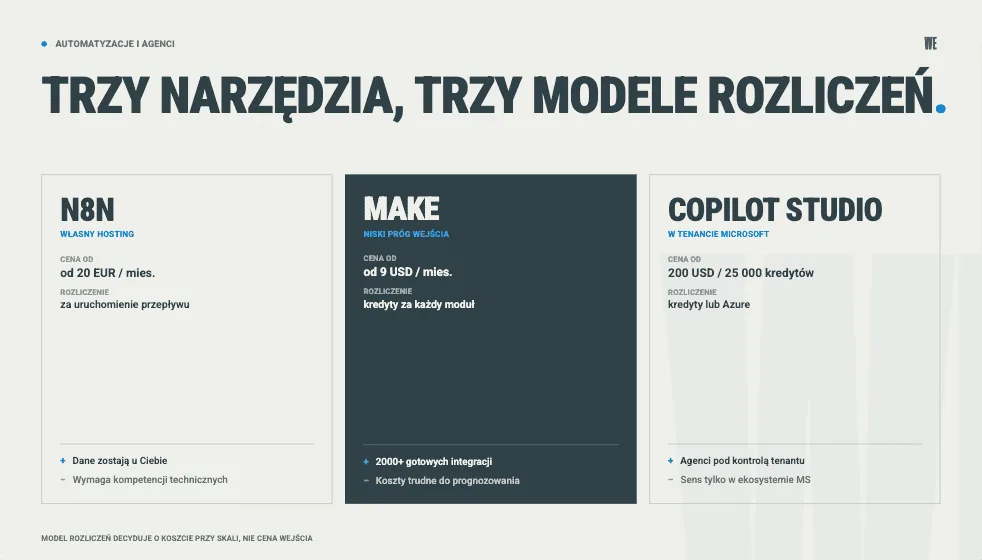
n8n. A platform for building automations and AI agents. Solutions can be built by hand in a visual interface (from blocks) or supported by, for example, an integration with Claude. n8n gains a big advantage in companies for which data security is key: solutions can be set up on your own server. Cloud pricing: Starter EUR 20, Pro EUR 50, Business EUR 667 per month (self-hosted), Enterprise by quote; the Community edition is free for self-hosting (n8n pricing). n8n charges per execution of the whole workflow, not per single step - with multi-step scenarios this billing is very efficient. The solution should be considered above all by companies with a technical background and a requirement to keep data in-house. What it does not do well: it is not a “click and it works” tool - building reliable flows, and especially maintaining your own hosting, requires solid technical skills. For people who will encounter building automations for the first time, n8n may be too hard at the beginning.
Make (formerly Integromat). A tool very similar to n8n, the way it works is almost identical, but the interface is much friendlier for non-technical people. With more than two thousand ready integrations the entry level to Make is decidedly lower. Pricing: Free, Core USD 9, Pro USD 16, Teams USD 29 per month, Enterprise by quote (Make pricing). Make charges credits for every module run (since August 2025 the unit is called a credit instead of an operation, at a 1:1 conversion), so extended, multi-step scenarios quickly eat up the limit - in addition, Make’s native AI modules consume credits in proportion to tokens. For smaller teams, marketing and operations that want to automate their tasks quickly without hosting anything - an ideal solution. What it does not do well: as mentioned above, with multi-step scenarios costs are hard to forecast.
Microsoft Copilot Studio. A tool for building your own agents plugged into Microsoft 365 and Power Platform. Billing model: a package of USD 200 per month for 25,000 credits or pay-as-you-go through Azure; holders of an M365 Copilot license build internal autonomous agents with no additional credits (Copilot Studio pricing). Recommended for companies already embedded in the Microsoft ecosystem that want to let employees build agents under tenant control. What it does not do well: credit consumption is variable and depends on the type of action, so the actual cost at scale is hard to predict. In addition, you get the full value of the solution only if your company operates in the Microsoft ecosystem anyway. How much such an agent costs in practice and where to start, we will soon lay out in a comparison of approaches to AI agents.
Google Workspace Studio. The counterpart of Copilot Studio on the Google side: a place to build agents and automations plugged into Gmail, Drive, Calendar, Docs and Chat. You describe the agent in plain language, and Gemini assembles a flow from ready steps, without code. From September 2026 Studio connects to external tools (among others HubSpot, Salesforce, Jira, Slack, Asana - for now in beta), supports webhooks and custom steps in Apps Script; new integrations have to be enabled by an administrator. Cost: no separate fee, Studio is in the Workspace Business and Enterprise plans, from Business Starter at PLN 31.50 per user per month (Workspace Studio availability). For companies on Google Workspace that want employees to automate repeatable tasks in email and documents on their own. What it does not do well: it does not work in Polish (as of September 2026, Studio supports 8 languages and Polish is not among them). A flow has at most 20 steps, and the daily run limit per user can stop all flows until the next day. External integrations are fresh, so critical processes and ones spanning several systems are better built in n8n or Make for now.
Voice - voicebots and speech synthesis
ElevenLabs. A very often chosen voice engine for speech synthesis, voice cloning and voice agents. It supports Polish, with several native voices - in two modes: a more natural one (higher quality, higher latency, for recordings) and a fast one (low latency, for live conversations) (Polish in ElevenLabs). Pricing is two-layered: subscriptions from Free through Starter (USD 6), Creator (USD 22), Pro (USD 99) to Business (USD 990) and Enterprise; speech synthesis is roughly USD 0.05-0.10 per 1,000 characters, and a voice agent about USD 0.08-0.16 per minute (within the package and above the limit) - confirm exact rates and details in the API pricing, because they differ between models (ElevenLabs pricing). A solution for companies building or needing voicebots, hotlines and audio content creation, including in Polish. What it does not do well: the per-minute price can mislead - it covers only the voice layer, and you pay separately for the language model and telephony, and billing also takes into account the length of the conversation including silence. The actual cost of a call is therefore clearly higher than the per-minute rate alone. An additional asset of ElevenLabs is its Polish roots thanks to the founders: Mati Staniszewski and Piotr Dąbkowski.
Besides voicebots and speech synthesis, an important element of the ElevenLabs ecosystem is the intensively developed ElevenCreative, in which, besides sound, you can also generate and process images or video, which allows creating full-fledged content and even marketing campaigns.
Meetings and notes
Fireflies.ai. An assistant that joins meetings in Zoom, Google Meet and Teams on its own, records them, transcribes them and creates summaries and task lists, and then lets you search the archive of conversations. You can also upload your own mp3/mp4 recording to Fireflies for transcription. It supports Polish (Fireflies language codes). Pricing: Free, Pro USD 10, Business USD 19, Enterprise USD 39 per seat per month (Fireflies pricing). For companies that want to standardize meeting notes and have access to the recordings and transcripts of their conversations (an additional asset: transcripts can be downloaded in various formats, including .md, which is an ideal solution for LLMs). What it does not do well: it can be unreliable at recognizing speakers - it gets lost in chaotic conversations where several people speak at once. In addition, the free recording limit runs out quickly.
Alternatives. A proven choice alongside Fireflies is tl;dv - it also officially supports Polish, with a free plan available for testing. Fathom has one of the more generous free plans and also works in Polish - test the quality before implementation. If you use ClickUp for task management or Loom for recording short video clips, in the appropriate paid plans or as an add-on there is also the option of using a notetaker to transcribe meetings.
Research and knowledge
Perplexity. An answer engine that searches the internet and returns an answer with source citations - unlike an assistant based on knowledge from before training. Roughly: Pro about USD 20 per month, Enterprise Pro about USD 40 per user (confirm the current price on the Perplexity site). For analysts, consultants and teams that need current data and sources for answers. What it does not do well: quality depends on what it finds - it can cite a weak, SEO-boosted page or distort what the source says. The result still requires human verification.
Gemini Notebook (formerly NotebookLM) from Google. The opposite of Perplexity: it works only on the materials you upload yourself - documents, PDFs, presentations - and answers with references to your sources, not to web pages. The free plan is fully functional; a higher-capacity version is also built into Google plans (including Workspace Business Standard and above, NotebookLM). For anyone who synthesizes knowledge from their own trusted materials. What it does not do well: it is deliberately closed within your set - by default it will not pull in knowledge from the web (unless you tell it to), so it is only as good as the sources you give it. It works in Polish, although audio summaries sound best in English. The situation is dynamic, though, and audio quality has become significantly better in recent weeks - perhaps soon there will be nothing left to criticize.
Graphics and presentations
Presentations - Gamma. It generates whole presentations, documents and pages from a short prompt or outline; editing is done in natural language (you can also edit the materials yourself). Billed by credits, plans roughly from free through about USD 10-12 up to USD 20-25 per month (confirm at gamma.app). For teams that make a lot of presentations and want a quick first draft instead of an empty slide. What it does not do well: intensive generation and revisions quickly eat the monthly credit limit, and you have less precise control over layout and branding than in PowerPoint or Claude.
Graphics - Midjourney and Ideogram. Midjourney currently delivers the highest quality of generated image (plans roughly USD 10-120 per month), but companies with revenue above USD 1 million a year must use the Pro or Mega plan to have commercial rights. Ideogram is better at rendering legible text in graphics - logos, posters, mockups - and in paid plans gives a full commercial license and privacy. An important caveat for companies: the copyright status of images fully generated by AI is unsettled, and such works usually cannot be covered by copyright protection - this matters for brand assets.
For quick marketing materials the closest at hand is Canva with AI features built into templates - for non-technical people making graphics consistent with brand identity, also billed by credits.
In addition, almost every widely known LLM already has built-in native functionality for generating images or visual elements - natively in ChatGPT, NanoBanana in Gemini, Claude Design in Claude and more. NotebookLM itself can be used to generate infographics or presentations.
What is NOT in this ranking and why
We deliberately leave out the three categories below:
Personal consumer accounts - though not the tools themselves. The same Claude or ChatGPT has a consumer version and a business version; in the ranking we rate only commercial plans (Team, Business, Enterprise), because they give full control over data. We do not recommend doing company work on a personal, free account - in consumer plans data usually by default feeds model training, and the company has no influence over it. This is not a separate tool for the ranking, but the most common silent security gap.
Tools for developers. Code editors and assistants for development tasks are a separate, technical topic. We write the recommendations above for people making business decisions, not for development teams.
Vaporware. Tools that impress in a recording but that we have not seen working in use. We base the ranking on what actually works and is used by us and our clients.
There are no affiliate links in this article and no “partner tools” pushed to the top of the list. The order follows from the nature of the use cases and the quality of the tools.
How to choose a stack for your company
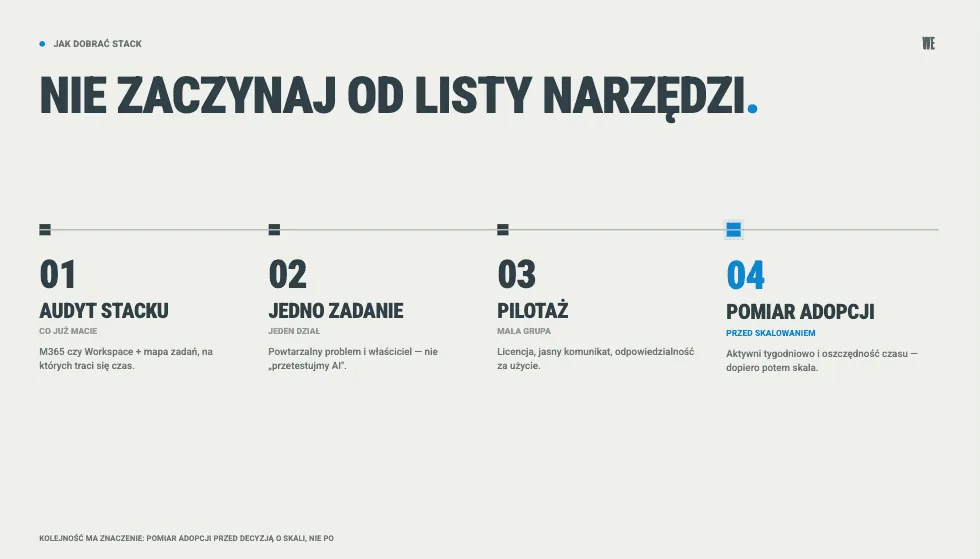
Do not start with a list of tools. Start with a question: what is to change? Which tasks are to be done differently than today. The order that works for us:
Audit of the stack and processes - what you already have (M365? Google Workspace?) plus mapping the tasks on which time is actually lost.
One task, one department - choose a repeatable problem and find an owner, do not approach it as “let’s test AI because we have to”.
Pilot with a small group - with a license, a clear message and simple responsibility for use.
Measuring adoption - weekly active users and time saved, only then scaling.
The most common and most expensive mistake is buying licenses without a designed workflow. You can see it in our work: in an adoption program at a pharmaceutical company, the internal AI tool had about 10% regular users at the start - after a change program, with ambassadors and a cascaded rollout, usage rose to 87%. It was changed not by another license but by a designed adoption program. It is similar with implementations - in one of our cases, tidying up the process cut the handling of requests for quotation from seven days to one, because the agent entered a ready workflow, not chaos. A full example of an adoption program with metrics is described in the case study of AI adoption in a manufacturing company.
The conclusion is uncomfortable for license sellers: the tool is a necessary condition, not a sufficient one. The best stack without people, rules and a planned program is an expensive investment in tools, yet with an almost guaranteed lack of return.
If you want to pick a stack for your process and move from licenses to actual use, book a call - 30 minutes, no obligations. We do AI consulting, AI implementations and AI training for companies, which close the tool choice with actual use by employees.
Frequently asked questions about AI tools for business
Which AI tools for a small company and which for a large one?
A small company starts with one general assistant (Claude, ChatGPT or Gemini) and possibly a meeting tool - cheap, no IT department, with an immediate effect. A large company adds a layer of security and scale: commercial plans with data control, automation (n8n, Make, Copilot Studio) and agents plugged into systems. The line does not run at the number of tools but at whether you need central control over data and access.
Which AI tools are safe for company data?
Safe are the commercial plans (Team, Business, Enterprise) of tools that by default do not train models on your data - this applies to Claude, ChatGPT, Microsoft Copilot and Gemini in their business versions. Risky are personal free and consumer accounts, on which data often by default feeds training. Data security is, after all, the most frequently cited barrier to AI implementations in Polish companies - named by 65% of surveyed enterprises.
Which tool to start with?
With the one that fits your existing stack and one specific task. If the company is embedded in the Microsoft 365 ecosystem - Copilot. If in Google Workspace - Gemini. If working with documents and security matter most - Claude. Do not start with several tools at once; one task, one department, measuring the effect, only then expanding.
How much does a sensible AI stack for a company cost?
The starting point is the cost of an assistant license - roughly USD 20-30 per user per month net - plus possibly a meeting tool (USD 10-40) and automation (from a few or a few dozen EUR per month upward). But the real cost is not the price list but the cost of one license that is actually used. With adoption at 50% you effectively pay twice as much for each actual user, so the implementation and the adoption program have to be added to the budget.
How often do we update this ranking?
Every quarter, and earlier when a vendor changes plans or prices - that is why for each tool we give a link to the official price list; the current as-of date is July 2026 (the prices given above mostly apply to annual plans). AI tool prices change more often than typical SaaS, so always confirm the final amount on the vendor’s site on the day of purchase.
Sources
Market data:
Vendors’ data policies:
Google Workspace Studio (as of September 2026):
Official price lists (as of July 2026):
Data on adoption and on shortening the handling of requests for quotation come from WeAreFuture projects.
