
Claude vs ChatGPT vs Copilot vs Gemini: there is no single winner, and the choice depends on your stack, your data and your specific use cases. In short: Copilot when the company lives in Microsoft 365, Gemini when it lives in Google Workspace, ChatGPT as a strong, neutral general-purpose assistant, and Claude for working with documents, long context and deeper agentic work - on files and in code. The most expensive mistake is buying licenses without an adoption plan, because the value comes from usage, not from the tool itself.
Below we break this decision down into its components from the position of an advisor who implements these tools for clients, not a seller of one license. WeAreFuture is a Polish AI advisory and implementation firm from Warsaw - we run implementations and adoption programs for AI assistants in manufacturing, financial and service companies. We verified the prices in the tables on July 24, 2026 against the vendors’ official price lists. We start with the comparison, then look at when each tool wins, and finish with a decision filter and the most expensive mistake at this stage.
Comparison table
Before you look at the numbers, one thing that saves you from a trap: these four tools are not priced with the same logic. Copilot is an add-on charged on top of a Microsoft 365 license - its price alone is not the total cost. Gemini is baked into the price of Google Workspace, with no separate line “for AI.” ChatGPT and Claude are standalone licenses that run alongside whatever the company already has. That is why we do not compare the “price of an assistant,” but the total cost of access to AI in the context of the stack you already pay for.
Prices
Net prices in USD and EUR, according to the vendors’ official price lists: Microsoft, OpenAI, Anthropic, Google Workspace. As of July 24, 2026. AI price lists change every few weeks, so verify the current rates before you decide - the promotional Copilot price applies through September 30, 2026.
Microsoft Copilot | ChatGPT | Claude | Gemini | |
|---|---|---|---|---|
Pricing model | Add-on to an M365 license | Standalone license | Standalone license | Built into Google Workspace |
Business plan | Copilot for business (add-on): $18 / €15.60 on promotion through 09/30/2026, normally $21 / €18.20; bundle with an M365 base: Business Standard + Copilot $23.50 / €20.36, Business Premium + Copilot $32 / €27.73 | Business: $20 with annual billing ($25 monthly), min. 2 seats | Team Standard: $20 billed annually ($25 monthly); Team Premium: $100 billed annually ($125 monthly); teams of 2-150 people | Included in the Workspace plan price: Starter $7 / PLN 31.50 (Gemini in a limited scope), Standard $14 / PLN 63 (full), Plus $22 / PLN 99 |
Enterprise | Add-on: $30, no seat limit | Priced individually, approx. $45-75 (about $60 on average), usually from 150 seats and with an annual commitment | From $20 per seat + usage billed like the API; 500k-token context | Priced individually; the Gemini Enterprise platform for agents is separate (approx. $21-30) |
All-in cost (watch out) | M365 base + add-on = approx. $34-87 per person in total | Business with no hidden bases; Enterprise with a high annual threshold | Enterprise varies with usage: approx. $60-250+ per person | = the price of the Workspace plan, no separate charge for AI |
For a company in Poland, billing in USD usually works on a reverse-charge basis (you do not add VAT as with a domestic purchase), and annual billing is often 15-20% cheaper than monthly. Some vendors bill locally: Microsoft lists prices in euros, while OpenAI and Google publish them in Polish zloty directly on their sites.
Data security
Let’s start with the good news: on business and enterprise plans, none of these tools trains models on your data by default. That is a shared starting point, not an advantage for any of them. The differences begin with data residency (that is, where the data physically sits) and with certifications.
It helps to know the backdrop of this conversation: in a 2026 study by PARP (the Polish Agency for Enterprise Development) and Jagiellonian University, concerns about security, privacy and cyberattacks are one of the three most frequently cited barriers to AI implementations - depending on company size, they are named by 49% to 69% of respondents. It is usually the first question from the security department, so it is worth having the answer before the conversation about price.
Microsoft Copilot | ChatGPT | Claude | Gemini | |
|---|---|---|---|---|
Company data used for training | No | No | No | No |
Data residency (choice of region) | Yes (incl. the EU data boundary) | Yes, on Enterprise (US, EU, UK, Japan and others) | Yes (EU, US, Canada, Asia-Pacific) | Yes, on higher plans (Workspace data regions) |
Additional standards | SOC 2, ISO 27001, ISO 42001 (AI), HIPAA (BAA), FedRAMP, HITRUST | SOC 2, ISO 27001/27017/27018, ISO 42001 (AI), HIPAA (BAA, selected plans) | SOC 2, ISO 27001, ISO 42001 (AI), HIPAA (BAA) | SOC 2, ISO 27001, ISO 42001 (AI), HIPAA (BAA), FedRAMP High |
The basic set - SOC 2, ISO 27001, ISO 42001 (the standard for managing AI systems) and HIPAA through a BAA agreement - is now held by each of the four. The differences are in the details, for example in public-sector standards (FedRAMP, HITRUST), which Microsoft and Google cover most broadly. Companies with the strictest requirements may also consider self-hosting, outside these four.
Details and current certifications on the vendors’ sites: Microsoft Trust Center, OpenAI, Anthropic, Google Workspace.
Integrations
Microsoft Copilot | ChatGPT | Claude | Gemini | |
|---|---|---|---|---|
Native integrations (ecosystem) | Deepest - the tool lives in M365 (Word, Excel, Outlook, Teams, SharePoint) | Not embedded in an office suite - ecosystem-neutral | Claude in Microsoft 365, Outlook and Chrome; integration with Google Workspace | Deepest on the Google side - Gmail, Docs, Sheets, Meet |
MCP / API / connectors | MCP in Copilot Studio and M365 agents; Graph API | Mature API, MCP, 60+ connectors | API, MCP, connectors (incl. Google Drive, M365) | Gemini API/Vertex, managed MCP, Apps Script |
Native integrations tell you how deeply the assistant is built into the suite the company already uses - whether it works directly in email and documents, or “alongside.” MCP / API / connectors in turn determine which applications the assistant will connect to automatically: email, cloud files, a CRM or a drive. The more of them and the easier it is, the less manual copying of data back and forth.
Features
Microsoft Copilot | ChatGPT | Claude | Gemini | |
|---|---|---|---|---|
Working on files in the cloud | Yes (natively: SharePoint, OneDrive) | Yes (connectors: SharePoint, OneDrive, Google Drive) | Yes (connectors: M365, Google Drive) | Yes (natively: Google Drive) |
Working on files on the local drive | No (only files in the M365 cloud) | Yes (ChatGPT Work, desktop app) | Yes (Cowork) | Yes (Gemini Spark, requires AI Ultra) |
Projects (context and files in one place) | Yes (Copilot Notebooks) | Yes | Yes | Yes (Notebooks in Gemini) |
Custom assistants (configured for a task) | Yes (Copilot Studio agents) | Yes (Custom GPTs) | Yes (via projects) | Yes (Gems) |
Skills (modular instruction sets) | Yes | Yes | Yes (rolled out across the organization) | No (Gems fill the role) |
Workflows with triggers (no-code) | Copilot Studio + Power Automate - the most mature visual builder | Workspace Agents (schedule, tools, background work) + Tasks | Routines (runs from a trigger or at a set time) | Google Workspace Studio - a “Starter” builder and subsequent flow steps |
Tools for developers | GitHub Copilot (separate product and license) | Codex (CLI + desktop) | Claude Code | Gemini CLI / Code Assist / Antigravity |
Polish language support | Yes | Yes | Yes | Yes |
The last three feature rows are where the differences become practical. Working on files in the cloud (SharePoint, OneDrive, Google Drive) is the baseline today and all four handle it: Copilot and Gemini natively in their ecosystems, ChatGPT and Claude through connectors. Working on files on the local drive (local, on your computer) is a narrower but growing capability: Claude does it through Cowork (an agent that works on a folder you point to), ChatGPT through the Work mode in the desktop app, and Gemini through Spark (requires an AI Ultra subscription). Copilot does not reach that far - it works on files in the M365 cloud, not on the local drive. Tools for developers are a league of their own: from our implementation practice, Claude Code leads in the quality of agentic work on code, alongside Codex (OpenAI) and Gemini CLI / Antigravity (Google). On the Microsoft side that role is played by GitHub Copilot - worth knowing that it is a separate product and a separate license from the Microsoft 365 Copilot in this table.
The “Skills” row needs one sentence of comment, because it is the youngest of these capabilities: skills are modular sets of instructions and company knowledge that the assistant loads on demand. The idea itself does not depend on the vendor, only the mechanism changes - we laid it out in the text on context files and skills in a company.
In the table the Polish language is a plain “Yes” for one reason: all four handle Polish, and at a high level. We deliberately do not grade it, because there is no recognized, product-level benchmark that would fairly compare these four assistants in Polish (existing tests mostly concern open models and narrow tasks). In our experience in Polish companies, language was not a barrier to adoption regardless of the model chosen.
One observation that ties these tables together: the capabilities for integration and for building custom assistants are increasingly converging across vendors - standards are becoming shared and nobody has a lasting advantage here. If so, the choice is increasingly decided by how deeply the tool is embedded in the suite the company already works in. In other words, the question “which assistant” usually comes down to “which suite does the company already live in.”
A separate decision is whether a license with a SharePoint connector is enough, or whether you need an AI assistant for business built for the organization. We described the criteria in a separate guide.
In short - for which company
Microsoft Copilot | ChatGPT | Claude | Gemini |
|---|---|---|---|
The organization lives in M365 | General assistant + scale and compliance requirements | Documents, long context, working on files and in code, agents | The organization lives in Google Workspace |
Microsoft Copilot - when it wins
Copilot wins when the organization lives in Microsoft 365 - daily work happens in Outlook, Teams, SharePoint and Excel. Then nativeness makes a difference that no tool “alongside” can match: Copilot will summarize an email thread, pull the decisions from a Teams meeting and build a formula in a spreadsheet without switching context. For a company deeply embedded in Microsoft, it is the shortest path from purchase to actual use.
There is, however, a cost trap that price lists keep quiet about. Copilot is an add-on charged on top of an M365 license - its rate ($18 on promotion for the Business version, $30 as the Enterprise add-on) assumes you already have the base paid for. Companies on older or cheaper plans must first upgrade that base, and that can cost more than Copilot itself. The cost per person is therefore often much higher than the number in the table, which is why with Copilot we always count “base plus add-on,” not the add-on rate alone.
Copilot also has the most mature layer for building your own solutions. Copilot Studio is the most developed visual builder of agents and automations among the four, tied to Power Automate, with the ability to create custom skills. If a company wants not only to “talk to AI” but to automate processes inside Microsoft without involving developers, that is an argument in Copilot’s favor.
ChatGPT (Business/Enterprise) - when it wins
ChatGPT wins as the strongest neutral general-purpose assistant - a tool that is not tied to any office suite and simply handles a wide range of tasks well: writing, analysis, research, code. For a company that does not want to tie its AI choice to the “Microsoft or Google” decision, it is often the most sensible first choice, because it works alongside everything.
The pricing model is friendly at entry and tougher at scale. The Business plan costs $20 per person with annual billing, is self-service and starts up in a few minutes. Enterprise is already negotiation and individual pricing, usually $45-75 per seat, with a minimum on the order of 150 seats and an annual commitment. That means Business is fully enough for smaller teams, and Enterprise comes into play only at larger scale and with tougher security requirements.
ChatGPT’s ecosystem neutrality is both its strength and its weakness. The strength: it does not force you to change anything else. The weakness: it is not embedded natively in an office suite as deeply as Copilot in M365 or Gemini in Workspace - you connect it through connectors, not “out of the box.” OpenAI’s direction is clear, though: Workspace Agents (the successor to Custom GPTs for business) move ChatGPT from the role of an assistant to the role of a layer that automates repetitive work.
Claude - when it wins
Claude wins where the core of the work is documents, long context and deeper agentic work. It handles long, complex materials exceptionally well (context of up to 500k tokens on Enterprise) - if AI is to work on your contracts, analyses or documentation, it is a natural candidate.
Claude is a platform that enables integrated work at different levels. Working on your files through Cowork (an agent that works on a folder you point to), some of the strongest tools for developers in its class (Claude Code) and plugging into your systems through MCP mean that when AI is meant not only to answer but to do complex work on files and in code, Claude is exceptionally strong.
One practical note from 2026: buying Claude Enterprise directly is sometimes a bottleneck, and a more effective path goes through a partner from the Claude Partner Network. If you are considering Claude for business seriously, the question of “which license and how to buy it” is worth spelling out separately - we laid it out in the text on the Team, Max and Enterprise plans. It is a good starting point if the “who is it for” map pointed to Claude for you.
Gemini - when it wins
Gemini wins when the organization lives in Google Workspace. There is no “should we buy AI on top” decision here at all, because Gemini is already in the plan price (in the full version from the Standard level) and works natively in Gmail, Docs, Sheets and Meet. For a company on Workspace it is the lowest possible barrier to entry: a tool you already pay for, which you only need to switch on and start using.
Beware of confusing naming, because it is easy to overpay or buy the wrong thing. “Gemini in Workspace” is an assistant included in the price of the suite. “Gemini Enterprise” is a separate platform for building agents, priced separately (on the order of $21-30 per seat). They are two different products, and when planning a budget it is worth knowing which one is being discussed.
On automation, Google has caught up with the competition. Google Workspace Studio is a no-code builder in which you build a flow that starts from an event (the so-called “Starter”) and connects subsequent steps, and in a separate step you can plug your own assistant (a Gem) into an automation running in the background. For a team that wants to automate repetitive work without code and without leaving Google, it is a strong argument.
How to choose? A simple decision filter
The most common scenario we see is buying licenses “because everyone has them.” That is the worst possible starting point, because it skips the only question that matters: will people use it. Instead, we propose a four-step filter.
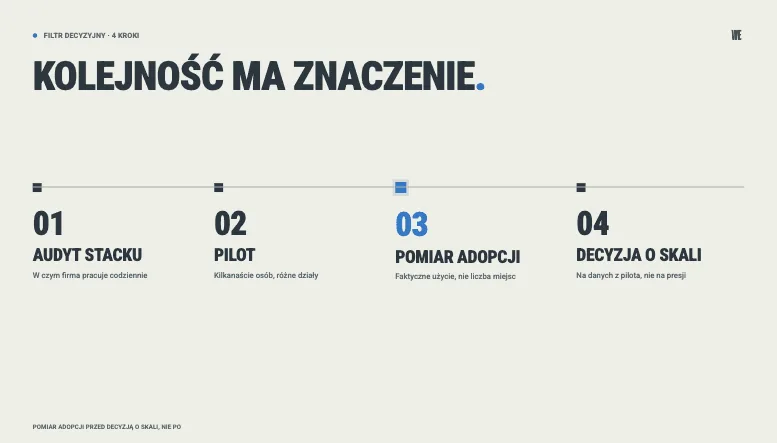
First, a stack audit - check what the company works in every day. If everyday work is Microsoft 365, the center of gravity shifts toward Copilot; if it is Google Workspace, toward Gemini; if tools are mixed or working with documents, on files and in code is key, ChatGPT and Claude come into play. Second, a pilot for selected people - a few or a dozen people from different departments, to see the tool on their own varied tasks, not on the whole organization at once. Third, adoption measurement: look at actual usage and time saved, not at the number of seats bought. Only fourth, a scaling decision - a conscious one, based on data from the pilot, not on the pressure that “we have to have something.” This is what the first stage of each of our AI implementations looks like.
And can you combine several tools? You can, and it often makes sense. For example Copilot for daily work in M365 and Claude for the heaviest work with documents. There is one condition: combining should result from specific use cases, not from a wish to “have every tool.” Each additional tool is an additional license cost and an additional adoption effort.
If you are looking for a broader picture than the assistants alone - automation, voice, meetings and graphics - we collected them in the ranking of AI tools for business for 2026.
The most common mistake: licenses without a workflow
A license nobody uses costs exactly the same as one that changes how a team works. Adoption makes the difference, not the invoice. This is the most expensive mistake at this stage: companies buy seats for everyone, tick off “we have AI” and come back to the problem half a year later, when it turns out that only a handful of people use it.
This is well illustrated by an implementation we ran at a pharmaceutical company. The organization already had an internal AI tool, but only about 10% of employees used it regularly - there were not enough skills or people to lead the change. The tool was there, the value was missing. What changed it was not buying more licenses but an adoption program: trained AI ambassadors, a cascading rollout across the whole organization, hands-on workshops, one-on-one consultations and e-learning. After the program, usage grew to 87%, and AI became part of the teams’ daily work.
The same mechanism worked in another industry: at a large Polish manufacturing company, after six months of an adoption program, 85% of employees used the assistant daily or several times a week, and the average user saved 5.7 hours a week. We described the whole course of it in the case study on AI adoption in a manufacturing company.
The conclusion is simple: the return on an AI investment is decided by what happens after the purchase. Choosing a tool from the table above is perhaps 20% of the success. The other 80% is implementation, AI adoption programs and workflow design - that is, work that no tool will do for you.
Frequently asked questions
Which AI assistant is best for a company?
There is no single answer - the best one is the one that fits your stack and daily tasks. For a company on Microsoft 365 the closest fit is usually Copilot, for a company on Google Workspace it is Gemini, and if neutrality or deeper work on documents, files and code is key, ChatGPT and Claude come into play. Start the choice with the question “where do we work,” not with a ranking.
Which AI assistant is the safest for data?
All business and enterprise plans of these four declare that models are not trained on customer data. Data security is not a curiosity - in the 2026 study by PARP and Jagiellonian University, concerns about security, privacy and cyberattacks are one of the three most common barriers to AI implementations, cited by 49-69% of companies depending on their size. The differences between vendors are in the details: certifications, data residency and retention policy - but each has the basic set, so security is not what differentiates these four today. Companies with the strictest requirements may additionally consider self-hosting, outside these four.
Can you combine several AI tools in a company?
Yes, and it can be sensible, for example Copilot in M365 for daily work and Claude for documents. It makes sense only when it results from specific needs, not from a wish to have everything. Each tool is a separate cost and a separate adoption effort.
How much do AI licenses cost for 100 people?
As a rough guide, with annual billing: ChatGPT Business is about $2,000 a month (100 × 20), Claude Team Standard is similar, and Copilot is about $1,800 in the Business version on promotion (100 × 18) or $3,000 in Enterprise (100 × 30) - in both cases plus the cost of the base M365 licenses. Gemini is included in the Workspace plan price. To each of these amounts add the cost of implementation and adoption - without it, licenses are often a dead expense.
What to choose with Microsoft 365 or Google Workspace?
With M365 the natural choice is Copilot, with Google Workspace - Gemini (it is already in the plan price). But that is a starting point, not the end of the analysis. If the core of the work is documents, long context or working on files and in code, it is worth considering Claude alongside the suite assistant, and if you care about a neutral general-purpose tool - ChatGPT.
Sources
Not sure where to start?
Book a free call - in 30 minutes we will help you work out which variant makes sense for your stack and team. That includes the case where the honest answer is “start with a smaller scope.” And if you would rather build the skills yourselves first, a good soft entry is one of our AI training for business
