
An AI assistant for business is a tool that answers employees' questions based on your own company documents (policies, procedures, manuals and technical documentation) and can point to the source with every answer. It works inside the organization, within existing permissions, for example in Teams. It is not a customer service chatbot or a widget on your website.
The problem it solves is familiar to anyone who works in a larger organization. In the Microsoft Work Trend Index 62% of respondents said they spend too much time searching for information during the workday (31,000 people in 31 countries, 2023). In Poland there is also a security angle: according to a report by PARP and the Jagiellonian University (BKL, April 2026) (PARP is the Polish Agency for Enterprise Development; BKL is its Human Capital Study), about 23% of companies in the 12 sectors with the highest AI potential use AI in business processes, and 64% of them mostly use free, publicly available tools. This means employees already look for answers in AI, but they often do it outside the company's control (so-called shadow AI) and without access to the company's actual knowledge.
In this article we explain how an internal assistant differs from a website chatbot, what exactly you get after implementation, what an AI assistant won't do (and what you shouldn't expect from it), how long implementation takes, what it costs and where to start. We also show two examples from our projects: a knowledge assistant in Microsoft Teams at a manufacturing company and an adoption program for an internal AI assistant at a pharmaceutical company.
We write from an implementation perspective: WeAreFuture is a Polish AI consulting and implementation firm based in Warsaw that runs knowledge assistant projects and AI adoption programs, from choosing the first area to measuring the outcome.
If you want to see how such an assistant handles your documents before you decide on a full implementation, we usually start with a 2-week PoC, on a selected knowledge area and with a group of first users.
Internal assistant vs website chatbot: two different projects
Search for “AI assistant” today and you will mostly find two kinds of offers: chatbots embedded on a website that answer customers, and consumer assistants for personal use. Both have their uses, but this article is not about them. An internal assistant built on company data is a separate project, with a different audience, different sources and different risks.
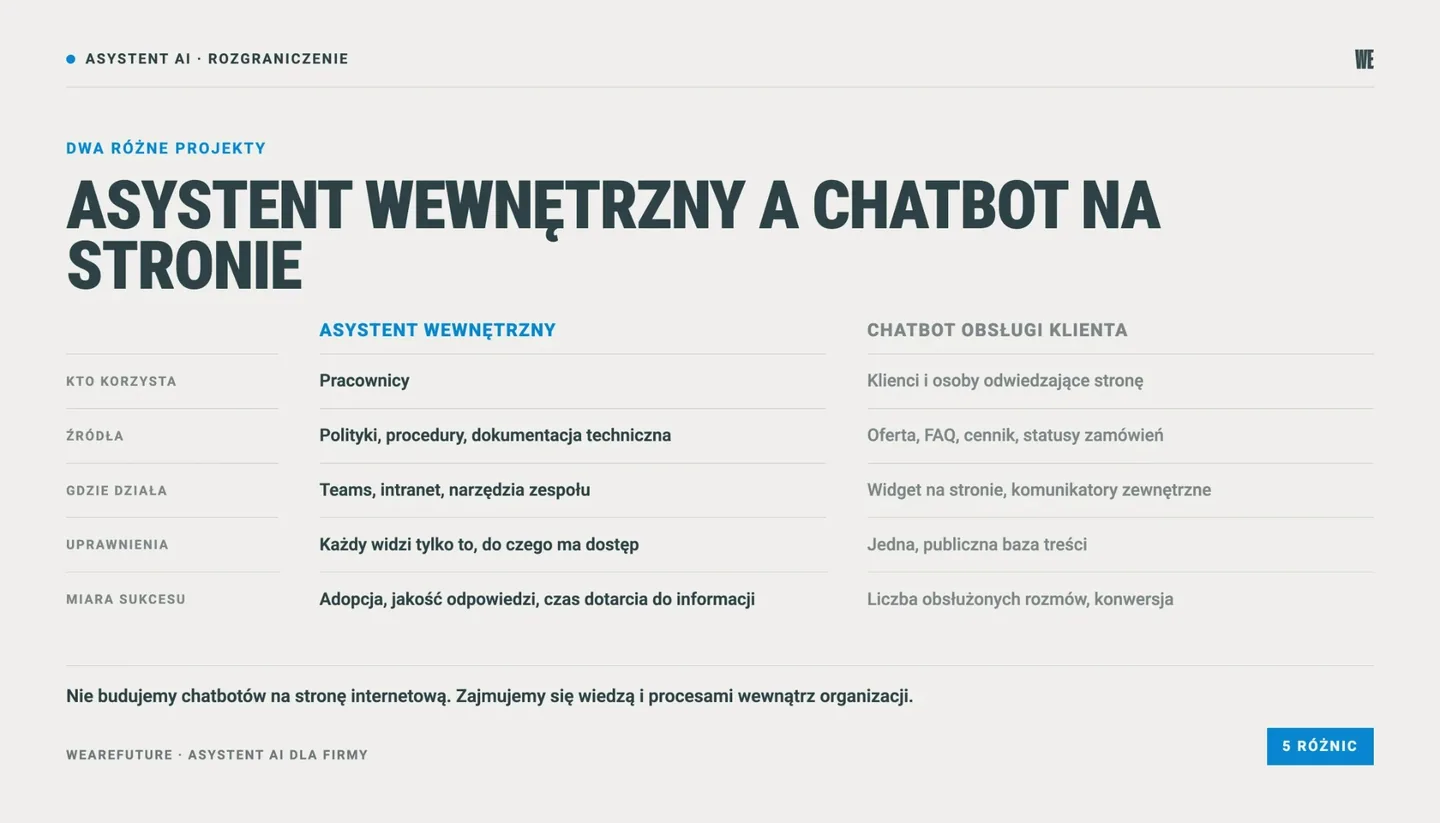
Criterion | Internal assistant on company data | Customer service chatbot on the website |
|---|---|---|
Who uses it? | Employees | Customers and website visitors |
What information does it answer from? | Policies, procedures, manuals, technical documentation, internal knowledge bases | Offer, FAQ, price list, order status |
Where does it live? | Teams, the intranet, tools the team already uses | Website widget, external messaging apps |
Permissions | Each employee sees only what they have access to | One public content base |
Goal | Faster access to knowledge, onboarding, protecting know-how | Taking load off the hotline, sales |
Measure of success | Adoption, answer quality, time to find information | Number of conversations handled, conversion |
The distinction matters because the design decisions are completely different. In an internal assistant, the key is that a production employee gets an answer quickly, can check it in the source and does not get an answer based on a board document they have no access to. On a website chatbot these problems barely exist, but others appear: the tone of customer communication, complaint handling, handing the conversation over to an agent. We don't build website chatbots. In AI assistant projects we work on knowledge and processes inside the organization.
What you get: company knowledge in one place, with cited sources
Policies, procedures and technical documentation in one place
In most companies we work with, knowledge is scattered: some on SharePoint, some on department drives, some in email attachments and some only in the heads of experienced employees. The assistant does not require moving these documents to a new system: documents stay where they are and the assistant uses them as sources. An employee asks a question in plain language, for example “what is the procedure for reporting damage to a company car?”, “what tightening method does the service manual give for this model?” or “how many days of on-demand leave am I entitled to in my first year?”.
Answers with cited sources
Every answer includes a reference to the document it comes from, with a link to the original. We treat this as a requirement, not a nice to have. An employee must be able to check where an answer came from, especially for safety procedures, HR matters or technical parameters. Citations are now standard in the business products of the largest vendors, for example in Microsoft 365 Copilot and in enterprise search in Claude, and company knowledge in ChatGPT Business and Enterprise can link to sources in answers drawn from company knowledge. The difference between an off-the-shelf tool and a well-implemented assistant lies in which documents those citations rely on. More on that in the section on limitations.
Access where employees already work
In our experience, an assistant that requires a separate login has a much lower chance of regular use. That is why we make it available in the tool the team keeps open all day, most often Microsoft Teams. Agents built in Copilot Studio can be published directly to Teams and Microsoft 365 Copilot, and making them available to the whole organization goes through administrator approval.
The permissions you already have
A well-implemented assistant respects existing permissions. Microsoft says so directly: Copilot only surfaces data that the user has at least view permission for, and a SharePoint-based agent will not answer from content the person asking has no access to. The Microsoft 365 connector in Claude works the same way, on delegated permissions, so users only see data they can already access. Search and reading are read-only, and write tools (such as sending email or editing files) are switched on by an administrator. On commercial plans, company data is not used to train models by default. This sets them apart from free, publicly available tools, which according to the PARP report are what 64% of surveyed companies using AI rely on most.
Knowledge that stays in the company
This is the benefit boards think about least at the start and value most after a few months of the assistant running. When an experienced process engineer, HR specialist or shift supervisor leaves the company, the knowledge of where things are, how to do a task correctly, whom to delegate work to and how to interpret procedures leaves with them. The assistant does not replace that experience, but it keeps the documented part of the know-how available regardless of turnover, and a new person does not have to wander around the team looking for an answer to “who do I ask about this?”.
What it looks like in practice: two projects
A knowledge assistant in Microsoft Teams at a manufacturing company
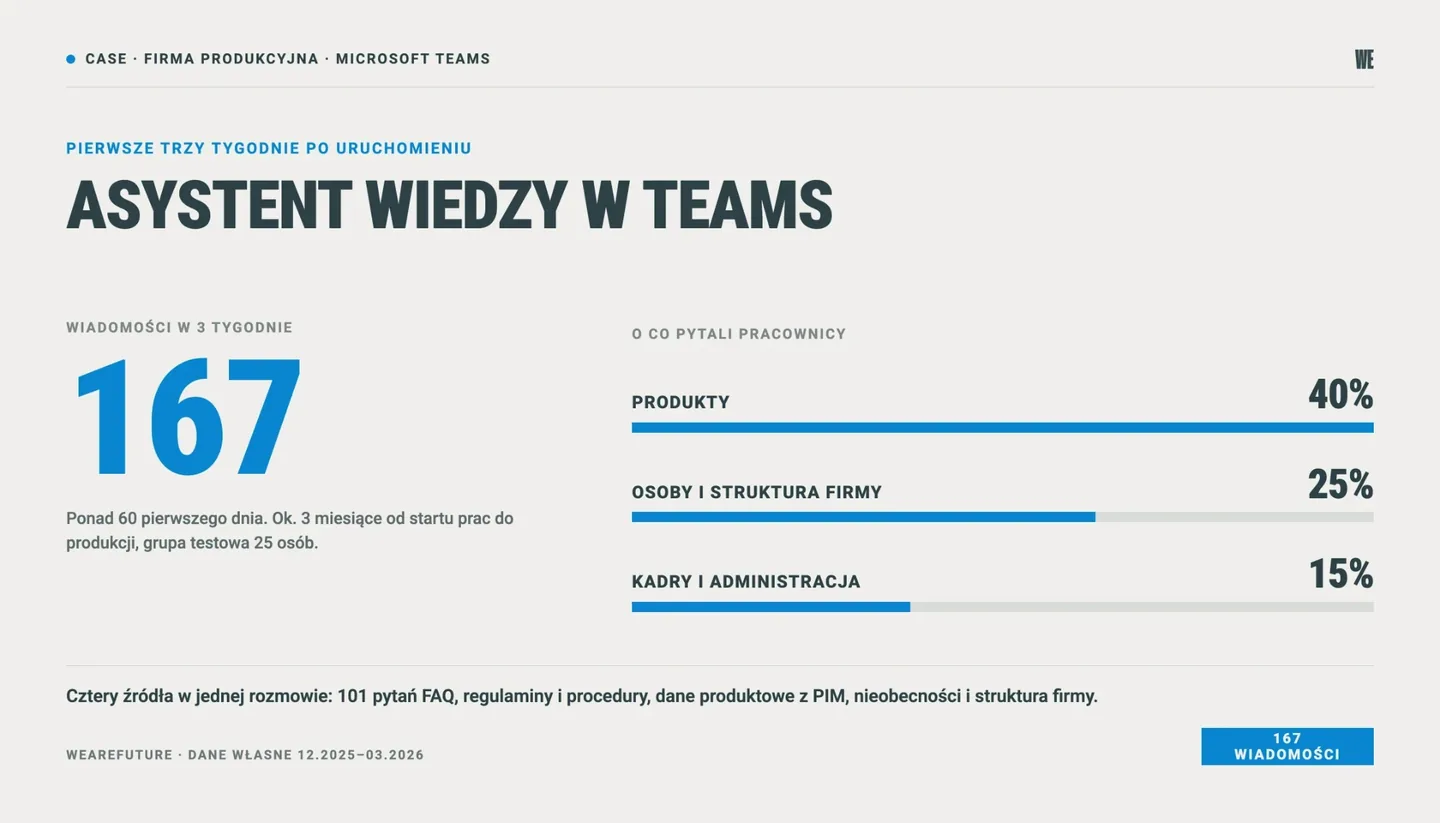
At a manufacturing company we built a knowledge assistant that employees use in Microsoft Teams. In a single conversation it combines four sources: a base of the 101 most frequent questions and answers, internal rules and procedures (including remote work, the company car fleet, IT and administrative procedures), product data from the PIM system, and information about absences and the company structure. It gives links to sources with its answers and does not answer questions outside the company knowledge base.
The production stage was preceded by a prototype that the client's team had built earlier with our support. Before launch, a test group of 25 employees and the support team checked answers to the most common questions and rated their quality. About 3 months passed from the start of work in December to the production launch in Teams in March. On the first day employees sent more than 60 messages, and 167 in the first three weeks: 40% were about products, 25% about people and the company structure, 15% about HR and administrative matters. After fixes to source linking, reports of hallucinations stopped. After the first few days activity dropped, which shows clearly that a launch alone is not enough (WeAreFuture data).
Adoption of an internal assistant at a pharmaceutical company
The second example shows that the tool itself is only half the work. The pharmaceutical company we worked with already had its own internal AI assistant, but only a small part of the team used it regularly. What was missing were skills and people who would show teams how to use it. The answer was not more features or licenses but an adoption program: AI ambassadors in departments, hands-on workshops, 1:1 consultations and Q&A sessions. After the program, adoption of the internal assistant grew from limited use to regular use by most of the team (WeAreFuture data).
How we measure whether employees actually use an AI tool, rather than just having access to it, is described in our article on AI adoption metrics in the company.
What an AI assistant won't do
This section matters to us as much as the previous one. Disappointment with an assistant most often comes from expectations nobody named at the start.
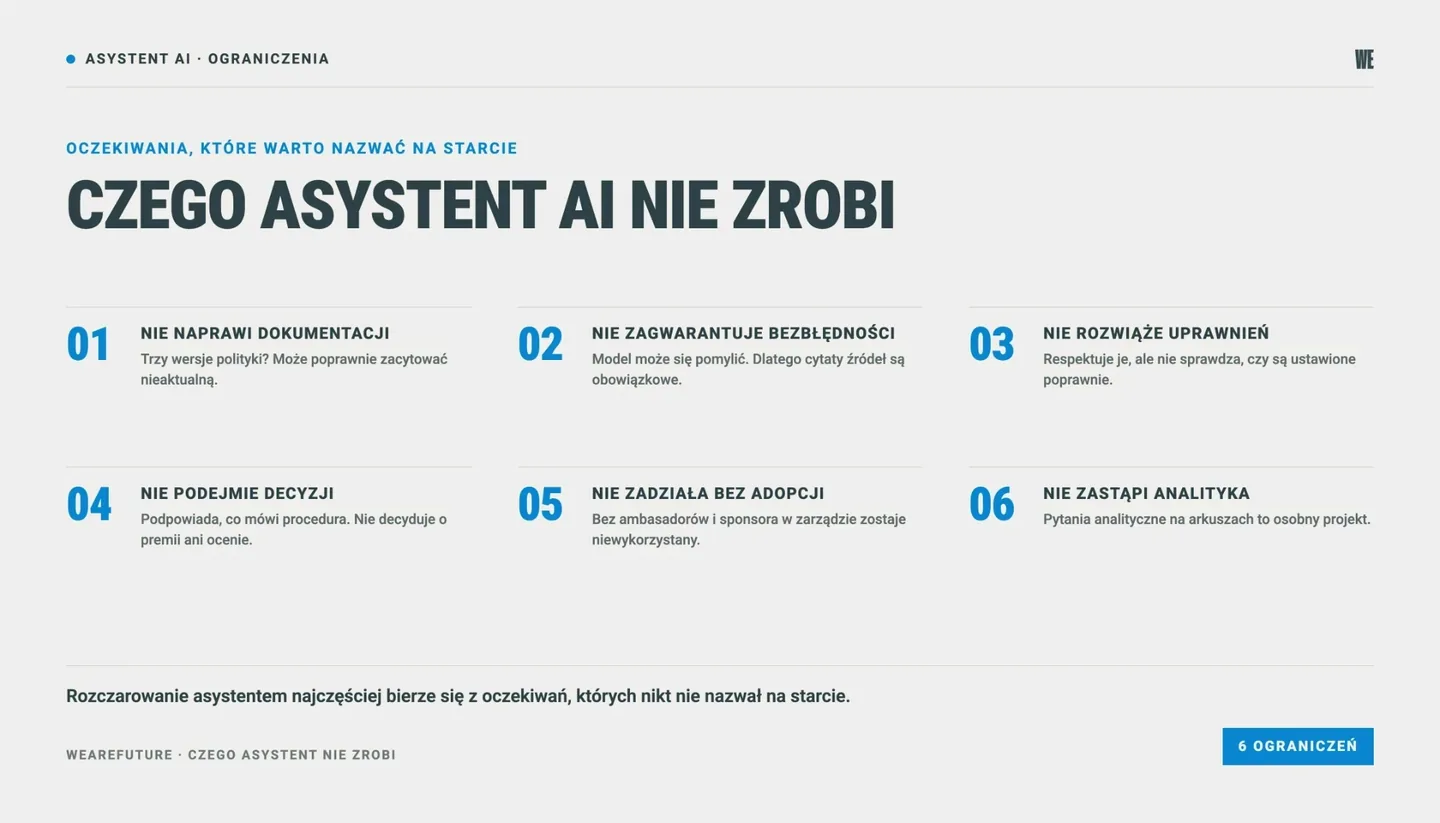
It won't fix the documentation it works on
The assistant answers based on the documents it was given. If the company has three versions of the same policy and a procedure from 2019 sits next to the current one, the assistant may base its answer on the outdated version and cite it correctly. In its guidance Microsoft stresses that Copilot and agents work best when content is current and well governed, and recommends, among other things, archiving old content and having site owners regularly confirm the state of their sites. According to Gartner, poor data quality is one of the main reasons why at least 30% of GenAI projects were expected to be abandoned after proof of concept by the end of 2025.
It won't guarantee error-free answers
Even with good sources, a language model can make mistakes. Microsoft notes that AI-generated answers are not guaranteed to be 100% factual, and Anthropic warns directly that the model can produce plausible-sounding but incorrect content. Companies are aware of this: in a 2026 McKinsey survey 74% of respondents consider inaccuracy a highly relevant AI risk. That is why source citations are mandatory, and for questions about safety or employment law, the employee should always open the document the assistant points to.
It won't solve the permissions problem, only expose it
The assistant respects permissions but does not check whether they are set correctly. If a payroll folder has been shared with “everyone in the organization” for years, the assistant may use it, because formally the employee has access. Microsoft points out that the default sharing settings in SharePoint are the most permissive possible, and describes a separate plan for cleaning up oversharing before a Copilot rollout. A permissions review is therefore a standard part of our implementations, not an add-on.
It won't make decisions for people
A knowledge assistant tells you what the procedure says, but it does not decide on bonuses, promotions or employee evaluations. AI systems used in employment, for example to screen candidates or evaluate employees, are classified in the AI Act as high-risk systems, and the requirements for them, after the changes introduced by Regulation (EU) 2026/1744, apply from December 2, 2027 (more in our article on the postponed AI Act deadlines). An assistant that answers questions about policies and procedures generally does not fall into this category, but the limits of its use have to be set deliberately.
It won't work without adoption
Both our examples show this: at the pharmaceutical company the tool was available and 10% of employees used it; at the manufacturing company activity dropped after the first few days. The assistant requires people to change a habit: instead of messaging a colleague in HR or searching through folders, they ask a question in Teams. Without an adoption program, ambassadors in departments and a sponsor on the board who uses the tool personally, even a very good assistant goes unused. We show how to build such a program in a large organization using the example of an ambassador program for a company with 2,200 employees.
It won't replace a data analyst
A knowledge assistant handles questions about the content of documents well. It does worse with analytical questions on spreadsheets, and a SharePoint-based agent does not handle summaries such as “how many files are in this folder” at all. Microsoft lists this explicitly in the limits of Copilot Studio agents. Analyzing sales or production data is usually a separate project, with a different approach to data.
How long it takes to implement an AI assistant
We usually plan the implementation of a knowledge assistant on company data, from the first test to rollout across the organization, at 8-16 weeks. The timeline depends mainly on three factors: the number and condition of sources, how well permissions are organized and how many departments the first rollout covers. An assistant for one department on a well-organized procedure base will be closer to the lower end (or even below it), and an assistant for the whole company, with technical documentation scattered across many sites and departments, closer to the upper end. The Teams assistant described above went from the start of work to production launch in about 3 months.
A typical sequence looks like this:
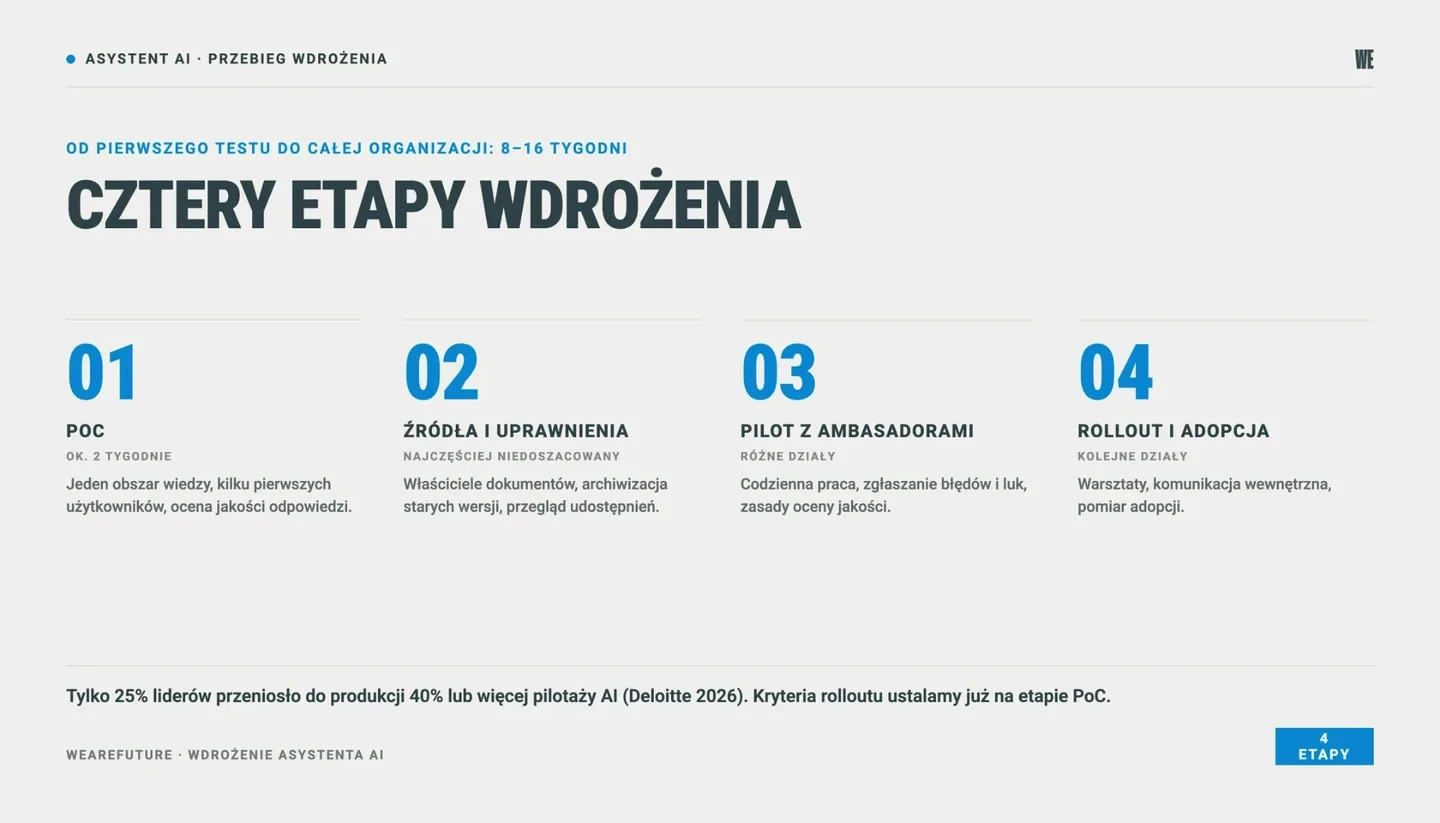
PoC (about 2 weeks). We choose one knowledge area, for example health and safety procedures, HR policies or the service documentation for one product line, connect the sources and check answer quality with a few first users. After this stage you know whether the documents are fit to work with an assistant and what questions employees ask.
Preparing sources and permissions. Naming document owners, deleting or archiving outdated versions, reviewing sharing. This stage is often the most time-consuming and the most often underestimated.
Pilot with ambassadors. A group of employees from different departments uses the assistant in daily work and reports errors and gaps in the documentation. At this stage we also agree who evaluates answer quality after implementation and how.
Rollout and adoption program. Making the assistant available to further departments, workshops, internal communication, measuring adoption.
A PoC that never reaches production is a cost without an outcome. According to a 2026 Deloitte study only 25% of surveyed business and IT leaders have moved 40% or more of their AI pilots into production. That is why, already at the PoC stage, we plan the next steps and the criteria that make the rollout decision simple once they are met.
What an AI assistant for business costs
It is hard to estimate the cost of a knowledge assistant reliably without knowing your sources, because the budget depends mainly on the scope of work, not on the tool itself. The total cost has three components:
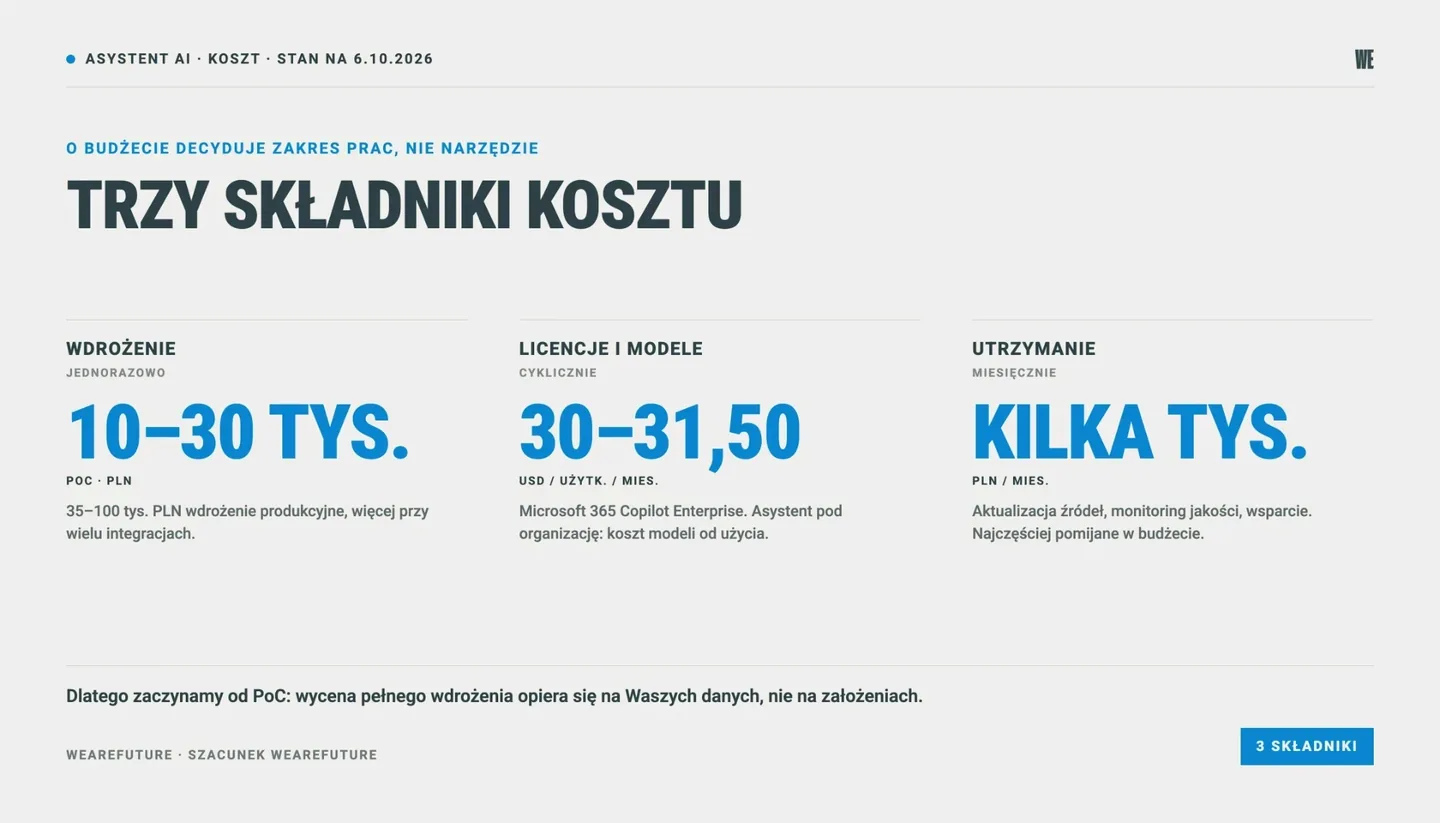
Implementation: one-off work covering the PoC, preparing sources and permissions, a pilot with ambassadors and (optional, but strongly recommended by us) a rollout with an adoption program. Most depends on the number and condition of sources (for example, one well-organized site with procedures, or technical documentation scattered across many departments and systems), on the scope of the permissions review and on the number of departments in the first stage. As a guide, a PoC is PLN 10-30k and a production implementation PLN 35-100k, more with many integrations with company systems (WeAreFuture estimate).
Licenses or model fees: a recurring cost that depends on the chosen platform and on whether the company already has business plans. For example, Microsoft 365 Copilot for large companies costs USD 30-31.50 per user per month (plus a Microsoft 365 license), companies with up to 300 users can choose the Business version at USD 21 with annual billing, and agents in Copilot Studio are billed in credits (Copilot Credits). Claude and ChatGPT business plans have separate price lists (Claude, ChatGPT Business). Prices as of October 6, 2026, in USD. An assistant built for the organization does not require a per-seat license, but it generates model and infrastructure costs billed by usage. In many companies part of the license cost is already being paid, because employees use Microsoft 365 or another vendor's business plan.
Maintenance: work after implementation, meaning updating and organizing sources, monitoring answer quality, supporting users and extending the assistant to new knowledge areas. As a guide, from a few thousand PLN per month (WeAreFuture estimate). This item is very often left out of the budget, yet it decides whether answer quality holds up after a few months. Responsibility for maintenance sits on both sides: the vendor (for example WeAreFuture) and a person inside the organization who keeps the sources up to date. In the Teams assistant described above, this role is played by a Data Steward on the client side.
That is why we start with a PoC. After two weeks of work on a selected area you know the condition of the documents, what questions employees ask and how much work it takes to clean up permissions, and the quote for a full implementation is based on your data, not on assumptions.
The cheapest offers that show up in search results for “AI assistant” usually cover configuring a single chatbot or a personal assistant for a small business. A knowledge assistant for an organization with several hundred employees, many sources and differentiated permissions is a different scope of work, so compare offers by what they include (permissions review, pilot, adoption program, maintenance), not just by the upfront price.
Where to start
Start with a question: which knowledge in your company is hardest to reach today, and who looks for it most often? In our experience the best first area is one with many questions, documented answers and no critical consequences of an error, for example HR policies, administrative procedures or product documentation for the sales team.
Before you start, prepare four things:
An inventory of sources: where the documents for the selected area are and who owns them.
A list of typical questions: collected from employees or from the channels they reach today (for example the HR inbox, the IT helpdesk, channels and chats in Teams).
An initial permissions review: especially on sites shared with the whole organization.
A baseline: how long it takes today to find an answer, how many questions reach support teams, how long onboarding takes. Without a measurement before the start, it will be hard to show the board the outcome and the return on investment.
At this stage you also decide whether a license with a ready-made connector is enough or whether you need an assistant built for your organization. In many companies a good first step is a business license with SharePoint or a drive connected. We compared the plans in our article Claude vs ChatGPT vs Copilot vs Gemini for business. A dedicated assistant makes sense when there are many sources, they are spread across systems, and the requirements for permissions, citations or quality evaluation go beyond what an off-the-shelf tool offers.
When NOT to build your own AI assistant
When there are few documents. A few dozen files and one team usually call for a business license with a project or connector, not a separate implementation.
When knowledge is not written down. If procedures exist mainly in employees' heads, the first step is to document them. The assistant cannot answer from knowledge that is not in the sources.
When nobody will own the sources. Without an owner who updates the documents, answer quality will drop month after month.
When there is no sponsor on the board. The assistant requires decisions on permissions, document cleanup and employee time for the pilot. Without support from the top, the project stalls at the PoC stage.
When the goal is a customer chatbot on the website. That is a different kind of project and we don't do it.
From an assistant to an AI system in the company
A knowledge assistant is often the first AI project that touches the whole organization, not just one department. That is why we treat it as part of a broader plan: with employee skills, data security rules and further use cases, for example AI agents that support specific processes. In our approach AI implementation, training and adoption programs and strategic consulting all work on one AI Engine: a shared company context used by people and agents. Time saved is not the only (or the most important) measure of the outcome. What matters more is the value employees create when they reach company knowledge quickly and can focus on work that AI won't do for them.
Let's talk about how a knowledge assistant could work on your documents. We start with a 2-week PoC, on one area and with a first group of users: a 30-minute call, no commitment.
Frequently asked questions about AI assistants for business
How does an AI assistant differ from a chatbot?
An AI assistant, as this article uses the term, is an internal tool: it answers employees based on company documents, with a cited source and within existing permissions. A customer service chatbot works on the website, answers customers based on public content and mainly serves to take load off the hotline or support sales. They are two separate projects, with different sources, risks and measures of success.
How long does it take to implement an AI assistant in a company?
We usually plan the implementation, from the first test to rollout across the organization, at 8-16 weeks. We start with a 2-week PoC on one knowledge area, then clean up sources and permissions, run a pilot with ambassadors and a rollout with an adoption program. The knowledge assistant in Microsoft Teams we built at a manufacturing company went from the start of work to production launch in about 3 months.
How much does it cost to build an AI assistant for a company?
The cost consists of a one-off implementation, licenses or model usage fees, and maintenance. As a guide, a PoC is PLN 10-30k, a production implementation PLN 35-100k (more with many integrations), and maintenance from a few thousand PLN per month (WeAreFuture estimate). Licenses depend on the platform, for example Microsoft 365 Copilot for large companies is USD 30-31.50 per user per month (as of October 6, 2026). An assistant built for the organization (for example RAG) does not require a per-seat license, but it has model and infrastructure costs billed by usage.
Is an AI assistant safe for company data?
On commercial plans (for example Microsoft 365 Copilot, Claude Team and Enterprise, ChatGPT Business and Enterprise), company data is not used to train models by default, and the assistant shows employees only content they have access to. The key, however, is to clean up permissions before implementation, because the assistant respects permissions but does not check whether they are set correctly.
Can an AI assistant make mistakes?
Yes. Vendors, including Microsoft and Anthropic, state directly that AI answers are not guaranteed to be error-free. The risk is reduced by good sources, mandatory citations with a link to the document, regular evaluation of answer quality and teaching employees when to check the source. For safety or employment law matters, the employee should always open the referenced document.
Is Microsoft Copilot, Claude or ChatGPT with SharePoint access enough?
In many companies, yes, especially at the start and with well-organized documentation. A business license with a SharePoint or drive connector gives answers based on company documents, usually with links to sources, and respects permissions. A dedicated assistant (for example RAG) makes sense when there are many sources spread across systems and the company needs more control over which documents answers rely on and how their quality is evaluated.
See also: AI adoption metrics in the company: how to check whether employees actually use an AI tool.
Sources
PARP, Jagiellonian University - “Artificial intelligence in companies: readiness for adoption, competences and needs” (BKL, April 2026, in Polish), report in PDF
Microsoft Learn - Data, privacy and security for Microsoft 365 Copilot
Microsoft Learn - Add SharePoint as a knowledge source (Copilot Studio)
Microsoft Learn - Publish an agent to Microsoft Teams and Microsoft 365 Copilot
Microsoft Learn - Get ready for Copilot with SharePoint Advanced Management
Microsoft Learn - Secure and governed data foundation for Copilot
Anthropic - Claude is providing incorrect or misleading responses
WeAreFuture - own data: knowledge assistant in Microsoft Teams at a manufacturing company (12.2025-03.2026) and adoption program for an internal AI assistant at a pharmaceutical company (adoption from limited use to regular use by most of the team).
