
Claude Cowork is Anthropic’s agentic work environment, in which Claude carries out multi-step tasks on your files, in your folders and in connected tools, instead of only answering queries in a chat. You describe the outcome you want, Claude plans and works step by step, and you approve the next elements and receive finished material for review.
Interestingly, employees at first completely ignore Cowork (or any equivalent of an agentic mode). Without proper training and plenty of inspiration, beginners find it hard to imagine how enormous the possibilities of Cowork are. Not knowing is one thing - an equally frequent reason for not using Cowork, as often as a plain chat, is fear. After all, the tool picks the steps and tools on its own, and edits and creates files before our eyes. Under controlled conditions, we hand it part of the control over the task.
So the change only begins later, at the moment when the employee stops treating Claude merely as an assistant, a place to ask questions, and starts assigning it tasks that normally take dozens of hours. That is a different habit, a different way of planning the day and, most importantly from the board’s perspective, a different set of administrative decisions to make before launch. In our experience, companies prepare for the first of these at most, and the third catches them off guard.
In this article: how Cowork differs from chat and from Claude Code, how Claude Cowork compares with Copilot Cowork (the two products have similar names, but a somewhat different design), what changes in the team’s daily work after a few months of use, what Cowork will not change no matter how well you configure it, and which organizational settings are worth deciding before the tool reaches employees.
WeAreFuture is a Polish AI consulting and implementation firm from Warsaw. We work in the Anthropic and Microsoft ecosystems at the same time, so we know Cowork in both versions from client implementations, not from marketing materials.
If you already have Claude licenses in your organization and are wondering whether to enable Cowork for the whole organization or first for a selected group, let’s talk about it in practice - 30 minutes, no obligation.
What is Claude Cowork and how does it differ from chat
Chat is a conversation. You ask a question, get an answer, copy it into a document and go back to your work. Cowork is a working session: you point to a folder, connect tools, describe the task, and Claude creates a plan and carries it out step by step, showing what it does and asking for approval wherever you draw the limits of its independence. Anthropic describes it as work you can hand off and pick up for review, not as another conversation mode.
A few facts that put the product in order, because it changes faster than most materials online. Cowork launched in January 2026 as a research preview. Today it is generally available on desktop (macOS, Windows, ChromeOS, Linux), while the browser and mobile versions are in beta. It runs on paid plans: Pro, Max, Team and Enterprise, and it is not in the free version. On the Enterprise plan, browser access has to be switched on by an administrator. Sessions can run locally on the computer or in the cloud on Anthropic’s servers (the latter option is in beta), and this difference has consequences I will return to in the section on administrative decisions.
It is worth separating Cowork from Claude Code right away, because for people who do not go deep into Claude’s architecture they can be confusing. Claude Code is a terminal tool that anyone can use, because it works really well for many tasks - for the purposes of this article, though, let’s assume it is used mainly by technical teams. Cowork is designed for non-technical people, and that is what makes it unique: the same agentic mechanics, but without a terminal and without the need to understand what a repository is. If you are interested in how both fit into company plans and what exactly you pay for, we laid it out in the guide to Claude plans for business.
Claude Cowork vs Copilot Cowork
Some time ago Microsoft released a feature called Copilot Cowork. The name really is similar, the promise is similar, but the way it works is completely different. We work in both ecosystems, so we can say what an integrator tied to a single vendor will not write: these are not competing versions of the same product, but two tools solving the same problem from two opposite sides.
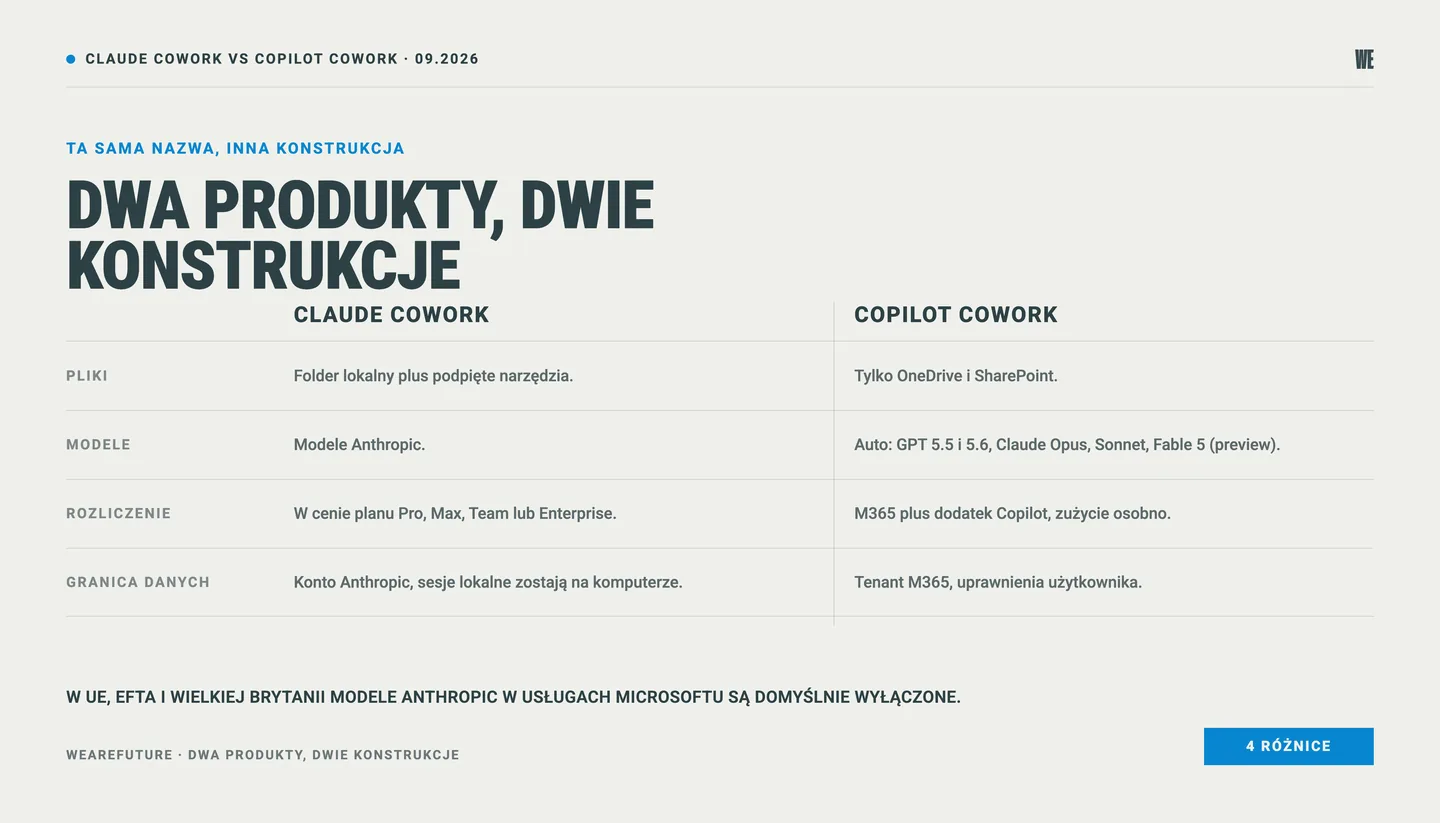
Claude Cowork | Copilot Cowork | |
|---|---|---|
Where it works on files | a local folder on the computer plus connected tools | only OneDrive and SharePoint, no access to local files |
Models | Anthropic models | Auto mode, with a choice of OpenAI models (GPT 5.5, GPT 5.6) and Anthropic models (Claude Opus, Sonnet, Fable 5 in preview), some available only after an administrator enables them |
Billing | within the Pro, Max, Team or Enterprise plan | a base Microsoft 365 plan and the Copilot add-on, while Cowork usage itself is billed separately, by consumption, with limits set per user or group |
Data boundary | account and organization on the Anthropic side, local sessions stay on the computer | the Microsoft 365 tenant, permissions and sensitivity labels inherited from the user |
The most important practical difference concerns files. Copilot Cowork does not reach local files and does not delete anything in OneDrive or SharePoint; it works only in the Microsoft cloud, within the permissions the user has anyway. Claude Cowork works the other way round: its natural environment is a folder on the employee’s drive. For a company with a well-ordered SharePoint and an “everything lives in the cloud” policy, the first approach is more convenient. For a company where technical documentation, quotes and spreadsheets are still created locally, the second saves a lot of tidying and guarantees the convenience of individual work.
There is also a difference that can surprise Polish companies. Anthropic appears in Microsoft services as a subprocessor, but for customers in the European Union, EFTA and the United Kingdom, Anthropic models are disabled by default and require a deliberate switch-on by an administrator in the AI Administrator or Global Administrator role. Microsoft notes that these models are excluded from the EU Data Boundary. The consequence is simple: a Polish company can use Copilot Cowork for months believing that Claude works underneath, while in its tenant that option was never enabled. This is not a criticism of either tool, just a setting worth checking before you compare the quality of the results.
What Copilot Cowork does better: it offers native support for the Microsoft ecosystem, so it sits in the environment where your people already are, inherits permissions and sensitivity labels, has approval of actions with a risk level label, and tasks triggered by an event or a schedule. It also has access to context from Teams chats and conversations, and employees describe their own skills in a SKILL.md file in their OneDrive. What it does not do well: it will not touch a file that is not in the Microsoft cloud, and its consumption-based billing requires separate configuration and separate budget monitoring.
What Claude Cowork does better: it works where the documents of many teams actually lie, copes well with long technical materials and lets one person build a repeatable way of working that a whole department will use. What it does not do well: it lacks full integration with the Microsoft 365 permission layer, and a session cannot be shared with another person (individual artifacts created in a session can be shared), which can be a nuisance in teamwork.
What Cowork changes in the team’s daily work
The background is that in Poland about 23% of companies actively use AI, and the most frequently cited barrier to implementation is concern about security, privacy and cyberattacks - named by 65% of respondents (PARP, the Polish Agency for Enterprise Development, and the Jagiellonian University, 2026). In this group, agentic tools are still a niche. So instead of describing potential, I will describe three patterns we see repeatedly in adoption programs.
First: tasks stop being split into “worth the time” and “not worth the time.” Analyzing correspondence with a supplier, comparing three versions of the same specification, pulling data from several dozen files into one spreadsheet - these are tasks that in the classic mode either went to the bottom of the list or quietly disappeared from it. When you hand them to an agentic tool, the cost of entry drops enough that they start getting done - quickly, accurately and painlessly for the employee. Not because someone ordered it, but because they became feasible in twenty minutes instead of half a day, a week or a month.
Second: the share of people who build, not just use, grows. In the Claude adoption program we have been running since December 2025 in a large Polish manufacturing company, after the first six months 44% of participants had built their own project, skill or automation, and 85% declared using the tool daily or several times a week. The methodological caveat matters: this is declarative data from a survey of program participants, not a hard measurement from the admin panel, and we treat it as one of the signals, not as proof in itself. The declared time saving was 5.7 hours a week per person in a group of 24. Some of these solutions were created in Cowork and Claude Code, and it is worth stressing that they were built by people from outside the IT department. We described the whole course of the program in the case study of Claude adoption in a manufacturing company, and the set of indicators we measured it with in the guide to AI adoption metrics.
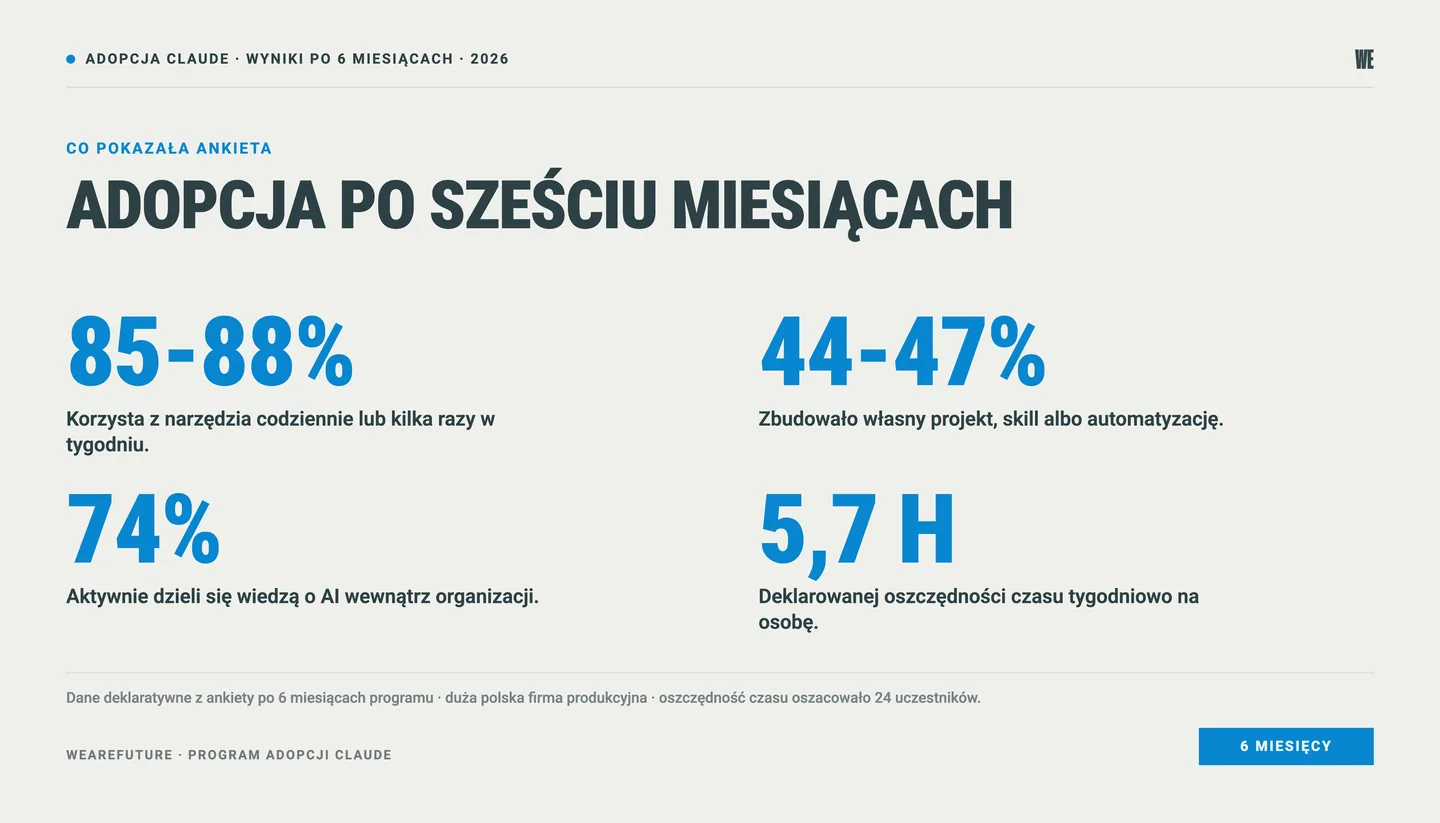
Third: the way employee-users talk about AI changes. Instead of “will AI even cope,” you hear “who has already done this? can you make a skill out of it and send it over?” In the same program, 74% of participants declared sharing knowledge, and attendance at the optional AI Office Hours sessions stayed above 75%. This is the moment when adoption stops depending on outside support and starts driving itself inside the organization.
There is one more change, which I consider the most important, though the hardest to measure. Time saving is a convenient metric, because it is easy to turn into a slide for the board, but it is not the most essential one. Value is created where employees start doing things they did not do at all before, because they were too expensive in time: comparative analyses before a purchasing decision, a compliance review of documentation, organizing a department’s knowledge. AI supports the growth of the organization and of the people who work in it - not just cost cutting, and in a conversation with the board it is worth making sure the second part does not cover up the first.
Before you decide who gets Cowork first, it is worth checking what maturity stage the organization is at. We help settle this as part of AI consulting and strategy.
What Cowork does not change
This is where the part starts that is missing from vendors’ materials, and that decides whether anyone is still using the tool after six months.
It will not replace an adoption program. Enabling Cowork in the admin panel takes a few minutes and does absolutely nothing for the team’s habits. The classic scenario looks like this: the company buys licenses, organizes a training, and six months later cannot answer the question of whether the investment made sense. Adoption is a change in behavior, and a change in behavior needs a rhythm: Q&A sessions, department workshops, a sponsor on the board who uses the tool themselves, and visible examples from colleagues at the next desk. That is how we built our AI adoption programs.
It will not organize knowledge for you. An agent working on your files is only as good as what is in those files. If a folder holds three versions of the same procedure and none says which is currently in force, Cowork will build a report on it with full confidence. Shared context, meaning context files and skills describing how the company works, which terms it uses and what it does not do, is a prerequisite, not an add-on. We broke it down in the post on context files and AI skills in the company.
A note here - Cowork can help in a fantastic way to organize the files in your folders and drives. But it is up to you to judge which of them are valuable.
It does not transfer responsibility. The tool performs the task, but the person who assigned and approved it is still responsible for the result. In agentic work this has a concrete implication: the more willingly a team uses the automatic approval mode, the fewer control points remain in the process. It is worth agreeing in advance which tasks may run in automatic mode and which require reading every step. The final result of AI work, however, must be verified by a human always and without exception - this is an absolute condition of conscious and effective use of AI.
It does not solve data security, it only moves it to another level. As long as the employee used chat, the question was: what may be pasted in. With Cowork the question is: which folders and tools do we give access to at all. This is a conversation to have before the tool is switched on, not after the first incident. In our view, education and a clear policy work better here than a list of bans that will be hard to enforce.
Administrative decisions before enabling Cowork
A few settings that decide more than the choice of plan. All of them are in the organization settings, in the section devoted to Cowork, and Anthropic describes them in its documentation for the Team and Enterprise plans.
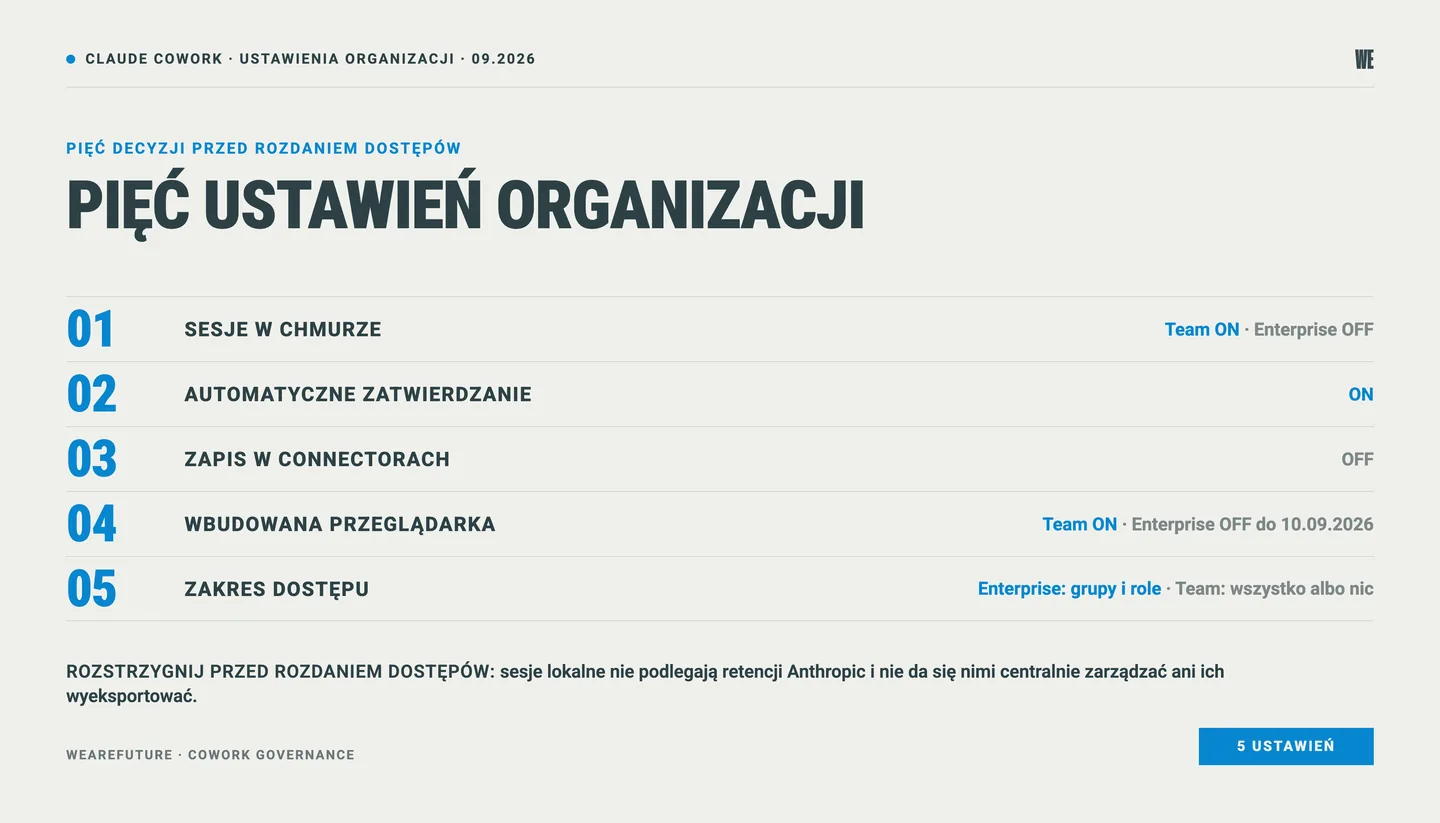
Local or cloud sessions. Sessions run in the cloud are saved to the user’s account in the organization and are visible to the administrator through the Compliance API. Local sessions stay on the employee’s computer, are not subject to Anthropic’s standard retention, and cannot be centrally managed or exported. If you have audit requirements, this is the first thing to settle, not a technical detail. The default setting differs between plans: on the Team plan the “Run Cowork in the cloud” switch is on by default, on Enterprise it is off by default, and after the owner turns it on, access still has to be granted to a group through custom roles.
Automatic approval mode. Enabled by default, and for many teams that makes sense. For processes where a mistake is costly, it is worth turning it off at least for the first weeks, while people are still learning to formulate tasks. After it is turned off, the “Auto-approve” option does not appear for employees in the mode selector.
Write permissions in connectors. The option that lets you skip approval for tools that write data is off by default, and in our view it should stay that way until you are clear on who uses it and in which processes. On Enterprise it cannot be bypassed through custom roles.
Built-in browser. It gives Cowork access to the internet during a task. Very useful for research, and at the same time it is the element through which Anthropic explicitly warns about the elevated risk arising from agency and network access (hence the blocking of high-risk sites and the security check at every action). On the Team plan it is on by default, on Enterprise it is off by default until September 10, 2026.
Scope, meaning who gets the tool. On the Enterprise plan you can control access through groups and custom roles, on the Team plan it works on an all-or-nothing basis. If you plan a pilot in one department, this has a direct bearing on the choice of plan. We described the differences between the plans in detail in the comparison of Team, Max and Enterprise, and we run the technical implementation as part of AI implementations.
When it is not worth going into Cowork
An honest look at the situations in which we advise against starting, or suggest postponing it.
When the team does not yet have the basics of working with AI. Cowork is a level above chat, and a person who cannot yet formulate a task well in a conversation will get a worse result, harder to assess, from an agentic session. The order matters: chat and projects first, then skills, and only then Cowork.
When the data is in disarray. I described this above and there is no shortcut here. If documentation lives in several versions with no owner, an agentic tool will speed up the duplication of the error, not its repair. AI can help organize a large number of documents, but the user must know where to draw data from and what effect to expect from AI support.
When the process requires full auditability of every step. With local sessions, the administrator cannot reconstruct the course of work centrally. For processes covered by regulatory requirements or an external audit, it is worth settling this with the person responsible for compliance before the tool reaches the team.
When there is no sponsor on the board. Without a person who uses the tool themselves and asks about progress, an adoption program usually fizzles out after the second month. This is an observation confirmed by every program we have run.
When the horizon is shorter than a quarter. The novelty effect gives a rise in usage in the first weeks, but changing the way of working takes several months. Six to eight weeks of regular contact with the tool is the minimum from which a habit starts; a one-day training will show a nice chart and nothing more.
From a single tool to a way of working
Cowork is an interesting tool, but on its own it is not a strategy. Value appears when it becomes one element of a broader puzzle: organized company context, shared skills, a clear data policy, an adoption rhythm and a few people who show others how it works in their role. In companies where that puzzle exists, agentic tools catch on quickly and without resistance. In companies where it does not, the next tool is just another investment in a license that few people use.
It is worth starting with the question of what should change in a specific department over the next quarter, and only then choosing the tool. It usually turns out that some needs are closed by chat with a good context file, some need a skill, and only some actually need an agentic session.
Let’s talk about what Cowork could look like at your company: where to start, who to give access to first and which settings to decide before launch.
→ Book a call - 30 minutes, no obligation.
Frequently asked questions about Claude Cowork
How does Claude Cowork differ from an ordinary conversation with Claude?
Chat is a conversation in which you get an answer to use yourself. Cowork is a working session: you describe the task, Claude creates a plan and carries it out step by step on the files you point to and in connected tools, asking for approval for irreversible actions. The result is a finished document, spreadsheet or presentation, not text to copy. Cowork can also edit your files, pull information and documents from other sources and modify the contents of the folder you give it access to.
Is Claude Cowork available in company plans?
Yes. Cowork works on all paid plans, including Team and Enterprise, and does not require a separate license. On the Enterprise plan the administrator controls access through groups and custom roles, on the Team plan access is granted to the whole organization at once. The desktop app is available on all paid plans, and browser access on Enterprise has to be enabled by an administrator.
Are Claude Cowork and Copilot Cowork the same thing?
No. The names are similar, the design is different. Claude Cowork works on local files on the employee’s computer and is included in the plan price. Copilot Cowork works only on files in OneDrive and SharePoint, requires a Microsoft 365 plan with the Copilot add-on, and bills usage separately. Anthropic models in Microsoft services are disabled by default in the European Union and have to be enabled by an administrator.
Where does data from Cowork sessions go?
It depends on the mode. Sessions run in the cloud are saved to the user’s account in your organization and are available to the administrator through the Compliance API. Local sessions stay on the employee’s computer, are not subject to Anthropic’s standard retention, and the administrator cannot centrally manage or export them. The choice of mode is an organizational setting and it is worth making this decision before access is handed out.
Where do you start rolling out Cowork in a team?
By choosing one group and one process, not by switching the tool on for everyone. In our programs this order works: organizing company context, a hands-on workshop for the chosen group, setting the data policy, and only then access to Cowork and a regular rhythm of Q&A sessions. The first measurable results usually appear after two to three months.
See also: Claude for business - Team, Max or Enterprise?, if you are wondering which plan to choose and what exactly you pay for. And Context files and AI skills in the company, if you want to prepare shared context before you let an agent into your folders.
Sources
Anthropic - Claude Cowork, product page
Anthropic - Get started with Claude Cowork
Anthropic - Cowork on Team and Enterprise plans
Microsoft - Copilot Cowork, frequently asked questions
Microsoft - Anthropic models in Microsoft Online Services
PARP and UJ - Artificial Intelligence in Companies (BKL 2026)
Data on the adoption program: WeAreFuture, declarative survey after 6 months of the program, a group of 24 people, a large Polish manufacturing company.
