
Update (October 2026): in response to numerous questions, we are adding one thing. If you want to buy Claude Team for your company but cannot pay by card, or the purchase has to go through your standard procurement process, write to us - we will help you choose a plan and get through the purchase.
For most companies the right choice is the Team plan: from $20 per person per month, with SSO, data excluded from model training by default and central management of skills. Enterprise adds a compliance layer (SCIM, audit logs, network control), but in 2026 it is easiest to buy through a partner, not directly. Max is a plan for individual heavy users, not for organizations. Below is the full comparison: prices, features, security and total cost.
We write this guide from the position of a practitioner, not a license seller. WeAreFuture is a Polish AI advisory and implementation firm from Warsaw - we deploy Claude in mid-sized and large companies as part of the Claude Partner Network and see up close which plans work in which organizations. We verified the prices and features on July 15, 2026 in Anthropic’s official materials. There is deliberately no comparison of Claude with other assistants here - that is a separate topic, which we broke down in the comparison of Claude, ChatGPT, Copilot and Gemini; here we answer one question: if Claude, then which plan.
1. Claude plans at a glance - table
As of July 2026, according to Anthropic’s official price list:
Plan | Price (annual billing) | Price (monthly) | Who it is for | Key difference |
|---|---|---|---|---|
Free | $0 | $0 | private testing | small limits, not for company use |
Pro | $17/mo ($200 upfront) | $20/mo | 1-2 people testing | the full set of tools (Claude Code, Cowork, projects), individual account |
Max | - | from $100 (5x) to $200+ (20x) | a single heavy user | 5-20x higher limits, earlier access to new features, still an individual account |
Team Standard | $20/person/mo | $25/person/mo | teams and companies up to ~150 people | SSO, central administration, data outside training, shared skills |
Team Premium | $100/person/mo | $125/person/mo | the heaviest users in a team | 6.25x the Pro limit, a seat that can be mixed with Standard |
Enterprise | individual pricing (seat + usage cost) | organizations of 100+ | SCIM, audit logs, RBAC, Compliance API, IP allowlisting, HIPAA-ready |
The verdict in one sentence: a company chooses between Team (start right away, by card, with SSO and skills governance) and Enterprise (the full compliance layer at organization scale) - the Pro and Max plans are individual accounts that work in a company only at the stage of testing with one or two people.
Three notes for the budget. First, Anthropic bills in dollars - for planning, use the exchange rate on the day of purchase; you settle VAT through the reverse-charge mechanism. Second, annual billing is 15-20% cheaper than monthly. Third, in the Team plan the Standard and Premium seats can be mixed - and that is the main cost-optimization lever, discussed below.
2. What you get in each plan - the features that matter for business
Anthropic’s price list names several dozen features; from a company’s perspective only a few building blocks count. All paid plans today include the full set of work tools:
Claude (chat + projects) - work on documents, analyses, proposals; projects group knowledge and files around a topic, with memory between conversations.
Claude Code - an agent that works on files and in the terminal. It was created for developers, but in companies it is increasingly used by analysts and operations: reports from data, organizing documents, automations.
Claude Cowork - an agentic environment for working on files without a terminal, designed for non-technical people; on company plans it is managed centrally (Cowork documentation for Team and Enterprise).
Skills - reusable packages of knowledge and instructions (e.g. “prepare a proposal in our standard”) that turn a general assistant into a tool that knows the company.
Connectors (MCP) - plugging Claude into company sources: drives, CRM, project tools; integrations with Slack, Google Workspace and Microsoft 365.
So the difference between the plans is not about “what Claude can do” - that is similar everywhere - but about three things: usage limits (how much work fits in a month), management (who controls settings, access and skills) and the security layer (what happens to the data and who audits it). These three axes decide the choice - not the feature list.
3. Which plan for your company - a decision in 60 seconds
A decision shortcut before we get into the details:
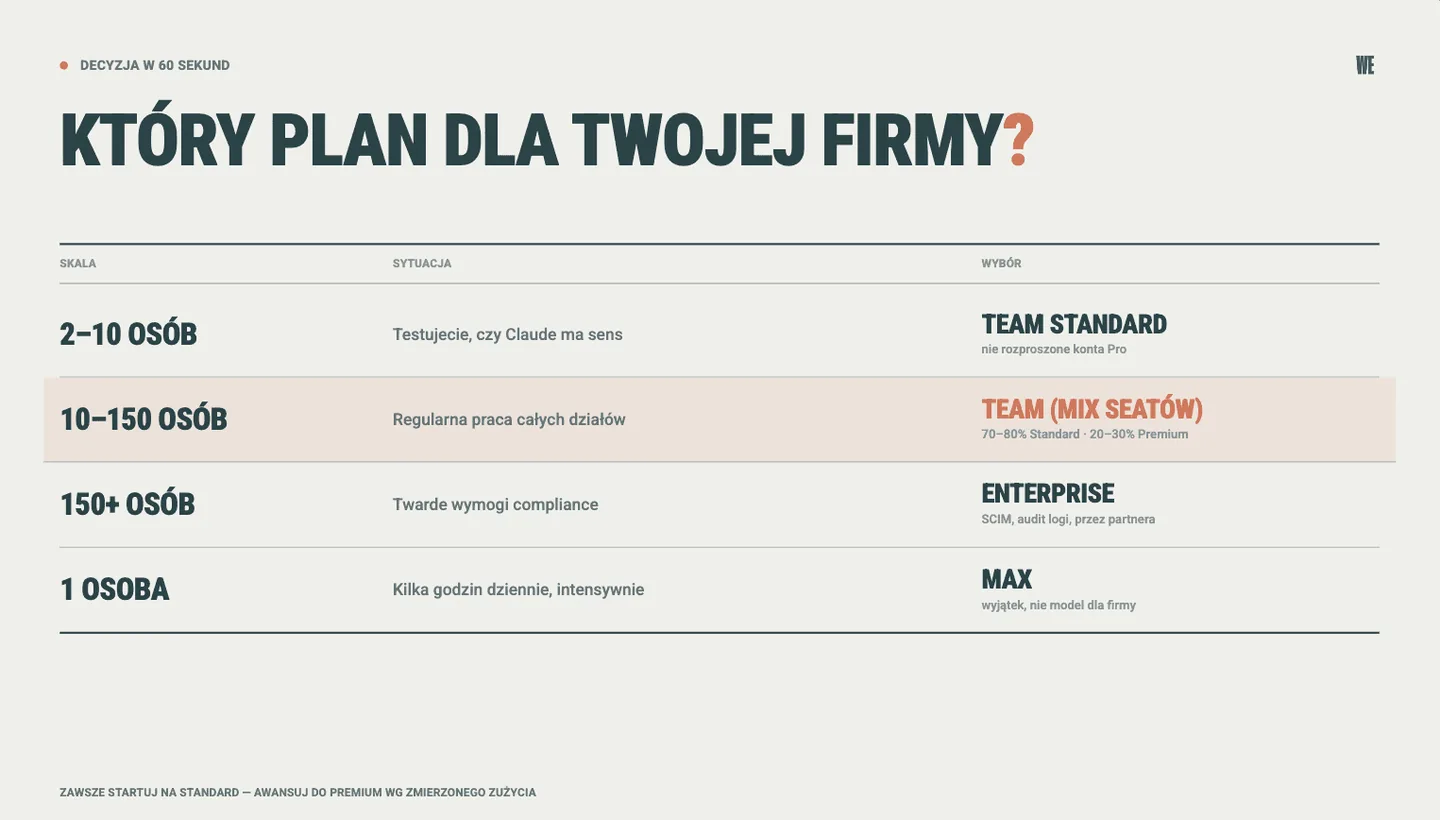
Testing with 2-10 people? Team Standard right away - not scattered Pro accounts.
10-150 people working regularly? Team with a mix of seats: mostly Standard, 20-30% Premium for the heaviest users.
More than 150 people or hard compliance requirements (SCIM, audit logs, network control, HIPAA)? Enterprise - preferably through a partner (why, in section 5).
One person works with Claude for several hours a day? Max - but it is an individual account; in a company treat it as an exception, not a model.
Scenario 1: 10 people are testing whether Claude makes sense. Team Standard right away, not loose Pro accounts. The cost is similar ($20-25 per person), and you get SSO, shared administration, an invoice to the company and - most important - data excluded from model training from day one. A pilot on private Pro accounts is the most common false start we see: after a month nobody knows who used what, with what result, and whose data went where.
Scenario 2: a 50-person department works with it daily. Team with a mix of seats. In practice a proportion of 70-80% Standard and 20-30% Premium works, for people who actually hit the limits. An example for 50 people (annual billing): 40 Standard seats ($800) + 10 Premium ($1,000) = $1,800 per month, about $21.6k per year. Everyone starts on Standard; an administrator reviews usage once a month and upgrades those who run short of the limit. The reverse order - Premium for everyone “just in case” - is the easiest way to overpay several times over.
Scenario 3: an organization of 200+ people, with security and audit requirements. Enterprise. Requirements arrive that Team cannot handle: SCIM (automatic account management from the company directory), audit logs, granular permissions per role, spending limits per user and organization, network-level access control and IP allowlisting, individual data retention terms. Pricing combines a per-seat fee with the cost of actual usage and is negotiated. The Team plan formally covers up to 150 seats, so above that scale the decision makes itself.
4. Team is not just licenses - it is shared skills and managing them
The most underrated difference between individual accounts and the Team plan is not about limits, but about knowledge. On Pro accounts everyone builds their own prompts and skills alone - the knowledge stays in private chats and leaves the company with the employee. On the Team plan an administrator manages skills centrally: uploads a skill once in the organization settings, and from that moment every employee has it enabled by default (documentation on managing skills in an organization). Team members can also publish their own skills to a company catalog, from which the rest install them with one click.
In practice this means that the standard of work - how we write proposals, how we analyze data, how we respond to clients - stops being tribal knowledge of a few power users and becomes a company asset with version control and an owner. We work this way ourselves: the entire WeAreFuture organization runs on Claude, and company skills and context files are managed centrally. How to build such a shared context from scratch, we described in the guide on context files and AI skills.
“Companies ask us about limits and prices, and almost never about skills - and that is the wrong order. A limit can be bought in a minute. A shared standard of working with AI takes months to build, and it decides whether the licenses pay for themselves” - Ignacy Bochiński, Co-founder and Partner, Clients & Markets at WeAreFuture.
5. Enterprise: what it adds and how to buy it in 2026
Enterprise is a plan for organizations where AI has to get through the security department, not only through the budget. On top of the Team features you get: role-based access with granular permissions, SCIM, audit logs, the Compliance API (a view of usage for audit), individual data retention, network-level access control with IP allowlisting and HIPAA readiness. For companies in regulated sectors - finance, pharma, healthcare, state-owned companies - it is usually an entry requirement, not an option.
There is one “but” that price lists do not mention: Enterprise is hard to buy directly today. From our conversations and partner experience (as of July 2026), Anthropic is growing at a pace at which direct Enterprise sales concentrate on the largest clients with large volumes. A mid-sized company that writes “we want Enterprise for 200 people” often waits weeks for an answer or does not get one at all. A more effective path goes through a partner from the Claude Partner Network: the partner knows the process, aggregates demand and conducts the conversation with Anthropic on the client’s behalf - and after the purchase stays on board for implementation and adoption.
See how we help with choosing and buying Claude licenses.
“The paradox of 2026: the hardest stage of deploying Claude in a large company is sometimes buying the license itself. We have seen organizations ready to start that got stuck for a quarter in contact with the vendor. The partner’s role begins before the contract is signed today, not after” - Maciej Rutkowski, CEO of WeAreFuture.
A practical tip: if compliance requirements do not block the start, do not wait for Enterprise. Start on Team (SSO and excluding data from training are already there), build adoption and usage data, and run the Enterprise conversation in parallel - with a hard argument in hand instead of promises.
6. Data security per plan - the main barrier, so check it first
Concerns about data security are the most frequently cited barrier to AI implementations in Polish companies - in the study by PARP (the Polish Agency for Enterprise Development) and Jagiellonian University (2026) it is cited by 65% of companies. The good news: with Claude it is a barrier to be managed by choosing a plan, not a reason to block.
Pro and Max (individual accounts): each user manages privacy settings alone. At company scale this means no control - you do not know who has which settings on and what data they paste in.
Team: company data is not used to train models by default, there is SSO, an administrator manages seats, connectors and skills from one panel, with billing and an invoice to the organization. Details in the Team plan documentation.
Enterprise: what Team has plus SCIM, audit logs, granular permissions, the Compliance API, individual data retention and network-level access control - the layer that compliance forces in regulated sectors.
One practical caveat: a plan will not replace rules. Before you give the team access, decide which categories of data may be entered into the tool and who is responsible for that - it is part of the implementation, not a checkbox in the settings.
7. What Claude costs in practice - TCO and traps
The license price is the beginning of the calculation, not the end. The full first-year cost consists of three items:
Licenses. For 50 people in a mix of seats: about $21.6k per year (the example from section 3). It is the easiest item to calculate and usually the smallest.
Implementation. Choosing processes and use cases, describing the company’s context, building the first skills, security rules, connectors to company systems.
Adoption. Training per team, work on a department’s processes, measuring usage week after week. In the first year the implementation and adoption budget is often comparable to the cost of licenses (WeAreFuture estimate from projects) - and it is the expense that decides the return on the whole.
Four traps that regularly inflate the bill:
Premium for everyone “just in case.” A Premium seat costs 5x more than Standard. Buy according to measured usage, not according to positions in the org chart.
Usage credits without a budget. After the limits are used up, an administrator can buy additional usage (usage credits) - convenient, but without a monthly cap set it can surprise you on the invoice.
Exchange rate and VAT. Billing is in USD; with 50+ seats, exchange rate swings mean a difference of hundreds of PLN a month. You settle VAT through reverse charge.
Unused seats. The most expensive item of all: a Standard seat that nobody uses is $240-300 a year thrown away per person. With typical adoption “without a program” (a dozen to twenty-some percent of the team), most of the license budget is lost.
8. How to calculate whether Claude pays off - the math on one sheet of paper
The return on Claude is calculated more simply than elaborate ROI calculators suggest. You need four variables: the number of people, the share actually using it (adoption), hours saved per week and the full cost of an hour of work (salary with overheads). The formula:
Annual value = number of people × adoption × hours saved/week × cost per hour × 46 working weeks
A conservative example for 50 people: with 60% adoption, 2 hours saved a week and an hourly cost of PLN 90, the value comes to approx. PLN 248k per year. On the cost side: licenses of about $21.6k (PLN 80-90k depending on the exchange rate) plus a comparable implementation and adoption budget in the first year. The first-year return comes out at about 1.4-1.5x; from the second year costs drop to licenses and maintenance, and the return rises to about 3x. For comparison: in our implementation at a manufacturing company (85% active users, 5.7 h/week) the time saved alone came to approx. PLN 47k per month (survey estimate) - more than the entire annual license budget.
The simplest sanity test is the break-even thresholds per seat, calculated in hours:
A Standard seat ($240-300 a year) pays back at about 1 hour saved per month.
A Premium seat ($1,200-1,500 a year) pays back at about 1-1.5 hours saved per week.
If a person who works with documents, data or clients does not find an hour of savings a week, the problem almost never lies in the tool, but in the lack of implementation in their processes.
Three things that spoil this calculation in practice:
No measurement before the start. Without a baseline (how long a proposal, a report or a reply to a client takes today) you cannot prove the savings. Measure 3-5 processes before the pilot.
Adoption taken on faith. In the calculation count only active users, not seats bought - dead seats are pure cost, which lowers the return on the whole.
Counting only hours. Hours are the easiest to count, but part of the value sits elsewhere: in one of our implementations a response to a request for quotation shortened from several days to around one day - that is not “hours,” it is won contracts that a slower competitor did not manage to submit.
Finally, set a success threshold (minimum), not only a target - as in every one of our proposals: for example target = 2 h/week at 60% adoption, threshold = 1 h/week at 40%. If after three months the pilot does not reach the threshold, stop the rollout and fix the implementation instead of adding seats.
Which other adoption metrics to set next to the success threshold and what to do when they start falling, we cover in a separate guide.
9. Licenses are not adoption - proof from an implementation
At the manufacturing company where we deployed Claude, after six months 85% of users were actively using the tool, time savings reached approx. PLN 47,000 per month (survey estimate), and employees recovered an average of 5.7 hours a week per person (WeAreFuture survey, 2026). The full description is in the case study of Claude adoption at a manufacturing company.
The result was not decided by the choice of plan. Three things decided it: work on specific processes instead of a general “use AI,” shared company context and skills instead of an empty chat, and measuring adoption every week and reacting where it fell. The Team plan provided the conditions for this - administration, data security, visibility of usage, central skills - but conditions are not the result.
10. How to deploy Claude in a company - step by step
A proven order from our projects:
Pilot (2-4 weeks): 10-20 people from different departments on Team Standard, two or three specific processes to start, metrics defined before the start (active users per week, hours saved, quality of the result).
Pilot analysis: who uses it and for what, where the effect is greatest, who runs short of the Standard limit. It is data for the rollout decision, not a presentation of opinions.
First shared skills: two or three processes from the pilot turned into organization skills - from that moment a new person gets the standard of work on the day of their first login.
Rollout in waves: department by department, each wave with training on its own processes - not one general webinar for everyone. How we structure such programs, we describe on the page about AI training for business.
Measurement and correction: a weekly adoption review per team, upgrades of seats from Standard → Premium according to actual usage, a reaction where usage falls.
Scaling decision: after 3-6 months you know whether you stay on Team or the organization has grown into an Enterprise conversation - and you have usage data that shortens that conversation.
If you want to go this route with a partner who has done it before - book an introductory call. In 30 minutes we will tell you which plan and which path make sense in your situation - also when the honest answer is “start with a smaller scope.”
FAQ - the most common questions about Claude for business
How much does Claude cost for a company?
The Team plan costs $20 per person per month with annual billing ($25 with monthly) for a Standard seat and $100-125 for a Premium seat with 6.25x larger limits. Enterprise is priced individually. For 50 people in a typical mix of seats, the license budget is about $21.6k per year.
How does the Team plan differ from Enterprise?
You can buy Team right away by card and it covers up to 150 people: SSO, shared administration, data outside model training, central management of skills, mixing Standard and Premium seats. Enterprise adds SCIM, audit logs, granular permissions, the Compliance API, network control and individual contract terms. The line in practice: around 100+ users or hard compliance requirements.
How do you buy Claude Enterprise?
In 2026 the most effective route goes through a partner from the Claude Partner Network, not through Anthropic’s contact form. Direct Enterprise sales concentrate on the largest clients, so mid-sized companies wait a long time for an answer. The partner runs the purchase process and stays on for implementation (WeAreFuture observation, July 2026). See how this process works with us.
Does Claude train on our company’s data?
On the Team and Enterprise plans, company data is not used to train models by default. On individual accounts (Pro/Max) the user manages privacy settings alone - which is why for company use we recommend business plans even for small teams.
Does Claude work in Polish?
Yes. Claude works in Polish at a high level: it understands and creates documents, proposals, analyses and correspondence in Polish, and also handles industry terminology. In our implementations in Polish companies, language was not a barrier to adoption.
How do you calculate the return on Claude in a company?
Multiply: number of people × share of active users × hours saved per week × full cost of an hour of work × 46 weeks, and compare with the cost of licenses, implementation and adoption. Break-even thresholds: a Standard seat pays back at about 1 hour of savings a month, a Premium seat at 1-1.5 hours a week.
From how many people does the Team plan pay off?
The Team plan starts from a few seats and already at 5-10 people it is usually a better choice than individual accounts - at a similar price per person you get SSO, administration, an invoice to the company and data excluded from model training. The upper limit is 150 seats, above which Enterprise is the natural next step.
Are Claude Code and Cowork included in company plans?
Yes. Claude Code (an agent that works on files and in the terminal) and Claude Cowork (an agentic environment for non-technical people) are part of the paid plans, including Team and Enterprise, and draw on the same pool of limits as chat. A Premium seat gives larger limits to people who use them intensively.
What Cowork looks like in a team’s daily work and which organization settings to settle before handing out access, we laid out in the guide to Claude Cowork for business.
