
We have been working with a large Polish manufacturing company since November 2025. Its staff are at different levels of technological maturity. The AI adoption program has been running since December 2025, and this article covers its first six months. Competitors are only starting to think about artificial intelligence systematically. Together with the client we are building an advantage that will be hard for the market to catch up with.
In this article: how in the first six months we went from “a few people experimenting with AI” to an organization in which 85% of respondents use Claude actively, that is daily or several times a week, 44% have built their own tool, project or automation, and the declared time savings come to about PLN 47,000 a month in a group of several dozen respondents, according to a survey estimate. With the metrics, the mistakes and the traps worth knowing before you start.
Market context: despite growing investment, only about 23% of Polish companies actively use AI (PARP, the Polish Agency for Enterprise Development, and Jagiellonian University, 2026).
When a Polish manufacturer reaches for Claude
Most Polish manufacturing companies choose between ChatGPT and Microsoft Copilot, because those tools are naturally in their field of view. Claude comes up in conversations only for specific needs that the other tools do not meet.
The common denominator of everyday work in a manufacturing company is working with long technical documents: industry standards, regulations, catalog data sheets, product documentation. Claude has a very large context window, up to a million tokens. Thanks to that, everyday tasks such as analyzing a contract and correspondence with a supplier, or extracting information from project documentation, can be done with AI without limits. Claude also adds a lot of value in tasks that require analyzing multilingual documents, as well as creating content in industry language: technical descriptions, acceptance protocols, compliance analysis against a legal act.
The client’s decision to bet on Claude (in parallel with the existing Microsoft infrastructure and its own AI tools: a quoting agent and an internal RAG assistant) was made after several months of working together. The organization was then at the “AI Engaged” level in our maturity model. They had awareness and two product pilots under way, but they lacked a system that would turn individual experiments into a culture of everyday “human+AI” collaboration.
The first three months: building the foundations of working with AI
In the first phase of the program we focused on clear communication: a Power Speech for the whole organization, a strategic workshop for the management board, the launch of an education platform (200 people with access to the e-learning course), the launch of the Ambassador Program, and then the first practical workshops for about 50 Ambassadors. From day one we openly communicated the goals and direction of our actions, and also a promise: AI will not take your job, AI will help you do it.
An interesting element was the applications to the Ambassador program. Normally, programs of this type get a dozen or at most 20 applicants from an organization of this scale. Here, more than 45 people applied. So as not to dampen enthusiasm and engagement, we started working with all the Ambassadors who applied.
The result of these activities: a Business AI Canvas with more than 80 ideas for implementing AI in everyday work, which we then sorted into thematic clusters according to the data we need for the relevant implementation areas. We also gained information about the overall level of AI adoption among employees, management’s engagement, and a list of problems to solve produced bottom-up by the employees themselves. The workshops also covered safe use of AI, and participants did the practical exercises in the free versions of the tools.
Output: the organization gained a common language, skills and a preliminary action plan. The next step was making it possible to carry out that plan in practice. We analyzed the current state of AI tools on the market and recommended investing in Claude. In the initial phase, paid licenses went to all the Ambassadors and to the most engaged people from various departments. Importantly, the first open users of Claude were the members of the Management Board themselves, present at the practical workshops and sharing their AI experiences with employees informally in the corridors.
In parallel, a clear AI use policy was created in the organization, so that using Claude would be not only effective but also safe. The security issue was and still is clearly communicated at various stages of adoption, so employees use AI consciously, reflect on their own without outside pressure and, when needed, anonymize data before processing it in the tool.
Three observations from this stage:
Knowing what artificial intelligence is is not enough. An employee leaves the workshop with a head full of concepts and no habit of reaching for the tool every day.
Without a sponsor on the board who uses Claude personally and sees value in it, the program loses its seriousness and engagement drops exponentially.
The most interesting conclusion: the team leading the transformation and working directly with employees must position itself as a helper, not a supervisor. Otherwise employees will start sabotaging the effort or pretending everything works, instead of trying to solve problems. Based on these conclusions we adjusted the second phase of adoption.
The next three months: activating and spreading AI
If this were a standard training project, most training companies would stop at this point, treating AI adoption as successful and finished. In reality, real AI adoption had only just begun.
In the following months we intensified education and advisory activities even more, primarily within the Ambassador Program, but not only there. Soon after the Ambassadors received paid licenses, we organized practical workshops in which we went deeper into the capabilities of the tool itself, as well as potential paths of using it for people in different roles.
We thereby started a cycle of regular weekly meetings, working name AI Office Hours, at which WeAreFuture experts answered participants’ questions on the spot, jointly solved reported problems, and also publicly praised every attempt and action with Claude. Over time participants became more willing to share their own use cases, which drove not only a growth in the usage rate but above all the building of concrete solutions that support and streamline the work of entire departments.
Ambassadors, equipped with the right practical and strategic knowledge, identified processes and problems in their immediate surroundings and then solved them using various Claude features: from building prompt templates, through projects with a broad (anonymized) knowledge base and skills that standardize specific areas of work, to building external applications using Cowork or Claude Code (and by people outside the IT department).
We collected feedback from participants on an ongoing basis, both verbal and structured, in the form of surveys. The following month it turned out that the biggest problem blocking further adoption was lack of time, so the general AI Office Hours sessions turned into departmental sessions. Ambassadors started to cooperate, building shared AI-based solutions. In addition, adoption began to spread to people outside the Ambassador Program, both through the Ambassadors’ education and support and by using the solutions they built (even though the people outside the Program were working on free plans).
We also successively ran further workshop sessions, responding directly to the needs reported by Ambassadors. We also started activities aimed at spreading adoption beyond the group of AI Ambassadors, working directly with specific departments and with individuals in 1:1 sessions.
The three-phase Claude adoption program: how did we design it?
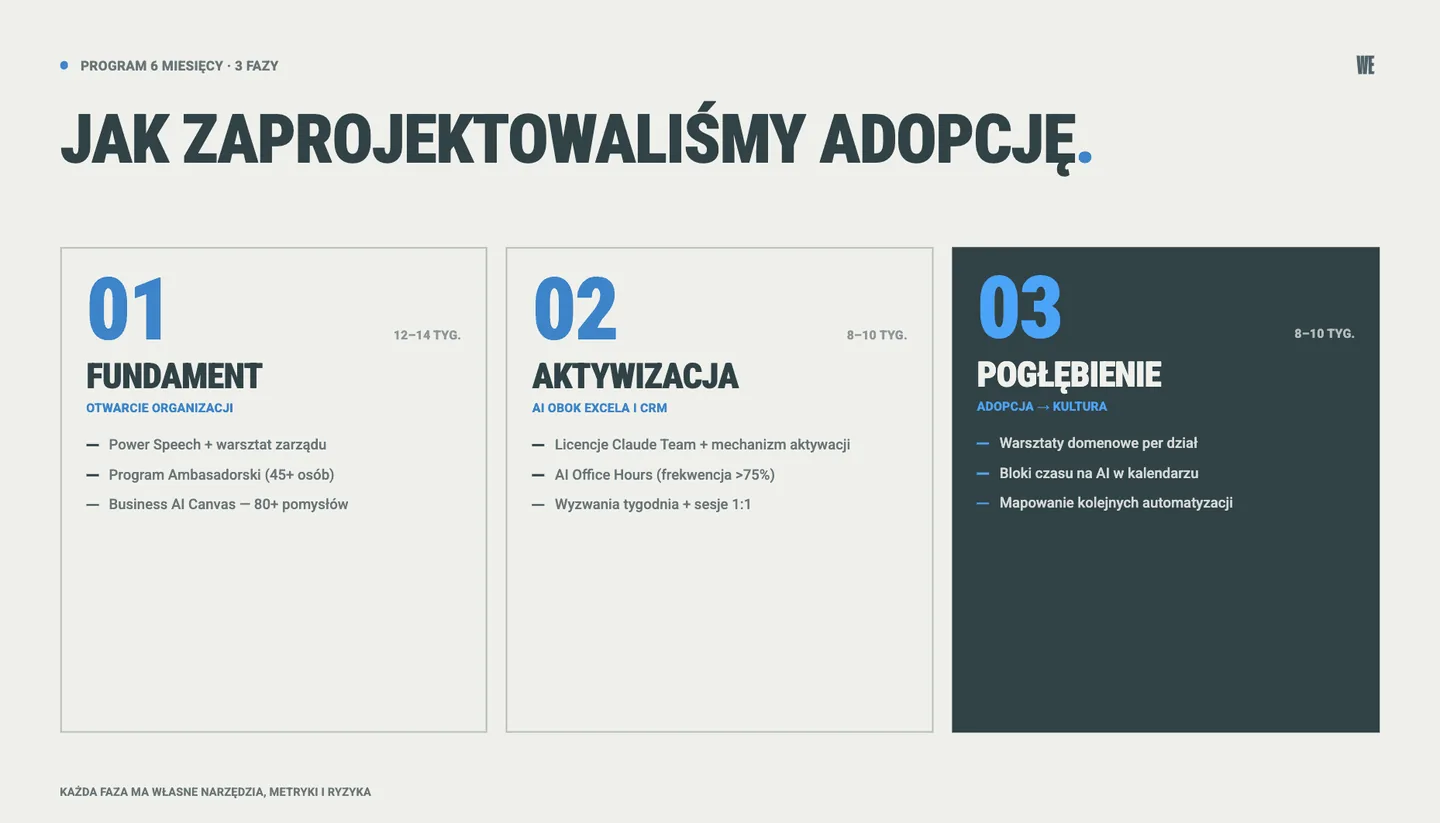
The program has three phases: Foundation, Activation, Deepening and scaling. Each phase has its own tools, metrics and potential risks.
Phase 1 - Foundation
Opening the organization to adoption, selecting AI Ambassadors, building a common language, identifying the first ideas. Five key activities: a Power Speech as a strategic signal for the whole company, a strategic workshop for the management board, announcing the recruitment to the AI Ambassador Program, launching the e-learning platform, and practical workshops with filling in the Business AI Canvas. Measurable output: a group of AI Ambassadors, more than 80 ideas identified bottom-up, a measurement of the “before” level, platform access granted and the start of promoting the course.
Phase 2 - Activation
Goal: make AI an inseparable part of the Ambassadors’ work, next to Excel, Word or the CRM system. The phase began with distributing Claude Team licenses to all ambassadors at once, with a simple accountability mechanism: if you do not log in within the first few days, the license passes to the next person. This approach worked as a filter for the truly engaged and as a motivator for those who were not convinced about the new technology. Low AI adoption threatens companies at every stage of transformation, and requiring quick activation breaks the first of the bottlenecks.
In parallel, a data security policy was developed in cooperation with the responsible people on the client’s side. It defines what data can be put into Claude, what requires anonymization, and what is outside the scope of working with AI. An important sequence: the policy was created when it started to be needed.
Next came demo practical workshops. We showed the full ecosystem: chat, Cowork, Claude Code, Office extensions, projects, skills, Microsoft 365 connectors. Ambassadors began reaching for more advanced modes and did not stop at a plain conversation in the chat.
How Cowork differs from chat and from Claude Code, and which administrative decisions precede enabling it, we described separately: what Cowork changes in a team’s work.
Then we launched a regular communication rhythm on the company’s ambassador channel. Wednesday is a post with the challenge of the week. The start of the next week is a post summarizing the previous challenge and Q&A sessions. Every post contains a concrete task: build a project, import a skill, show others how you solved your problem.
Allocating time for working with AI in employees’ calendars was also important. Artificial intelligence was not just an add-on. It was to become the foundation of employees’ daily work.
In parallel, AI Office Hours started, a Q&A session moderated by WeAreFuture experts. We went for a relaxed format: everyone comes with a specific question or presents their case. We took care of topic diversity and a low entry threshold, thanks to which we reached attendance of >75% at every meeting (even though the meeting was clearly communicated as optional).
The second pillar of activation is reactive 1:1 sessions on a direct request from an Ambassador. We did not announce individual sessions for volunteers. Ambassadors approached us themselves with problems, and when a topic turned out to be more complex, we held individual conversations. Three types of requests came back regularly: fear and basics (“I am afraid of AI, I just want to understand today where I can start in my role”), a good idea with a large dose of uncertainty, or getting stuck during implementation. Each of these types requires a different approach and support.
Phase 3 - Deepening and scaling
Goal: respond to the needs identified in the survey measuring the level of adoption and prepare a roadmap of actions for the coming months. We continue what works and add new elements: domain workshops, time blockers for individual work with AI in the Ambassador’s calendar (to develop initiatives started by Ambassadors), proactive mapping of further actions, where we talk to representatives of different departments and identify processes for further automations and implementations. We are moving to the point where adoption stops being a one-off initiative and starts to be a culture of daily work. It is important to keep this multi-threaded program moving for the coming months and years.
Metrics: how we checked that Claude works
Self-reported results of the survey conducted after 6 months of the program (05.2026):
Indicator | Value after 6 months |
|---|---|
Active users (daily or several times a week) | 85% |
Built their own project, skill or automation | 44% |
Improved pace of work | 90% |
Drop in tedious, repetitive work | 82% |
Increase in the quality of results received | 77% |
Increase in job satisfaction | 51% |
Actively sharing knowledge within the organization | 74% |
Average time saved per employee (of those who could estimate it) | 5.7 hours per week |
Total declared savings (calculated for 24 people) | ~136 hours per week |
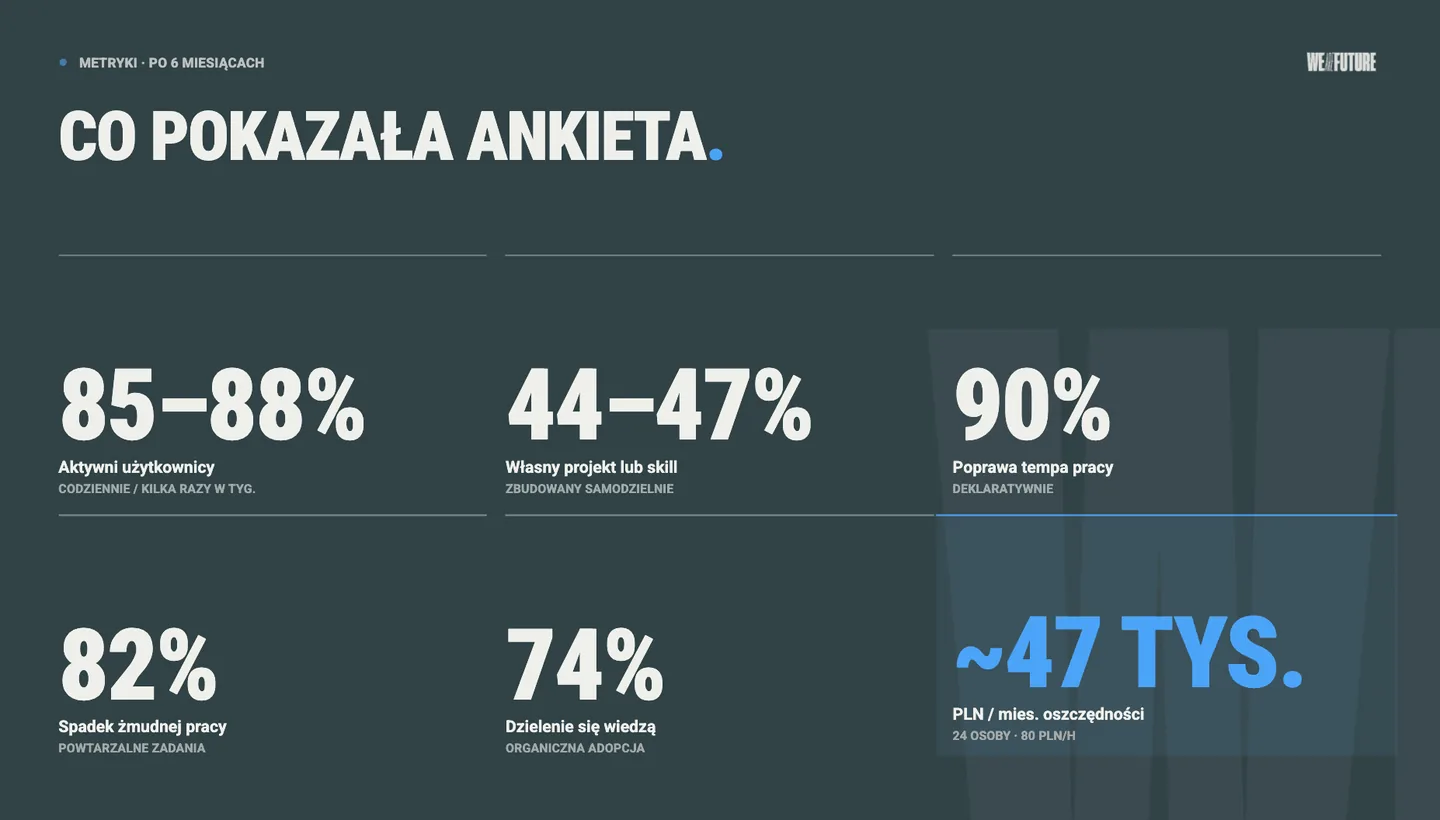
The average time saving could be estimated by 24 people, which translates to about 136 hours a week saved from tedious, repetitive work and moved to valuable, creative work. At a rate of PLN 80 per hour, this comes to about PLN 47,000 a month, over PLN 0.5 million a year, from a still fairly narrow sample of employees from one or two departments. This is a survey estimate, time converted into money, not a measured financial return. The ROI shows up above all in revenue terms (employees unblock work from a huge backlog, because many people struggle with queued tasks several weeks ahead).
The next step is extending adoption to all office employees, which, even at a lower efficiency rate, is estimated at several million zloty (PLN) of savings a year.
It must be added that the above data is self-reported. We run a hard “before Claude / with Claude” measurement on several specific processes in the next phase of adoption. A second observation: the strongest effect of AI adoption we see is in the pace and quality of work, the weakest in the level of stress. 23 of 39 people ticked “no change” in the question about stress before and after Claude, while as many as 90% of respondents admitted that they work faster and with better results.
We laid out the whole set of indicators we used to measure this program in a separate guide to AI adoption metrics: what to measure every week and what to report to the board.
A statistic that also deserves attention: 74% of ambassadors actively share knowledge about AI inside the company. This is the organic adoption mechanism the company wants most. Without this layer the ambassador program would be a set of individual users, not a source of further process changes.
Five use cases that worked best
From about eighty ideas from the Business AI Canvas and several dozen ideas presented at AI Office Hours and 1:1 sessions, patterns emerge that are worth showing. Below are five types of Claude applications that gave the organization the best results in the first six months of adoption.
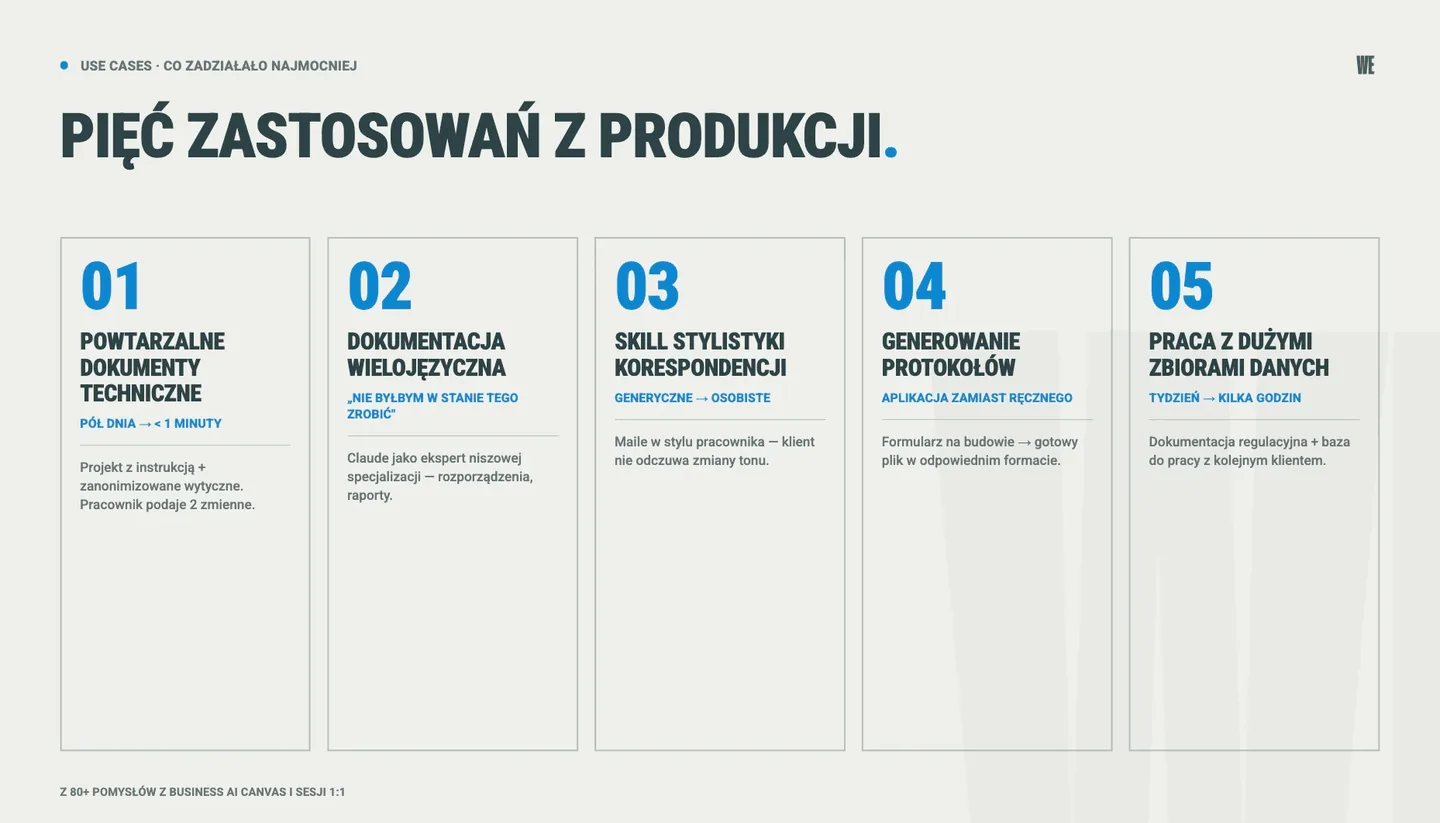
Use case 1: Generating repetitive technical documents according to set rules
A department of a few people creates up to 250 repetitive documents a month, selecting the right parameters and quotes according to defined rules and guidelines. Each of these documents involves calculations, selecting product parameters, describing requirements and producing the final document. For a new employee it is even half a day of work. An Ambassador, an expert in her field, built a project in Claude with an instruction describing the given employee’s role, the expected answer format and the rules for choosing values according to the specified guidelines, and attached the necessary (anonymized) documents the AI should refer to. The employee-user provides two input variables and Claude does the rest. Result: the task time fell from half a day to less than a minute, and customers receive a response the same day.
Use case 2: Working with specialized multilingual documentation
A project manager received a project from a very niche area. The key materials exist only in foreign languages, some without even English translations, and there are no Polish templates or guidelines. He built a project, giving Claude in the instruction the role of an expert in this exact specialization, with files containing regulations, anonymized input documents, guidelines and templates. Claude supported the manager both in everyday project tasks and in more complex matters, such as generating multi-page documents and reports. As he put it himself: “It is not even so much saving time - I would not have been able to do it at all.”
Use case 3: A skill for the style of customer correspondence
During our educational workshops we mention the phenomenon of AI slop: generating a large amount of low-quality content with AI. A specialist who contacts customers wanted Claude to support her in writing email correspondence, but in her own style of expression, so that the customer would not feel a change of tone in a continuous exchange of messages. This case started the building of skills by employees who correspond with customers by email every day. AI personalization changes Claude’s response from generic to personal.
Use case 4: Generating protocols and standardizing documents
During projects carried out at the client’s site it is not uncommon to forget to fill in the necessary documentation. As a result, formalities were often done wrongly, which generated further problems and even more work. One of the Ambassadors solved this problem by replacing manual writing of protocols with a simple web application. An employee on the construction site types in or selects the right options in a form, and at the end the application generates the correct file in the right format and type by itself.
Use case 5: Working with documentation and large data sets
A huge number of employees from almost every department use Claude to analyze technical documentation, create new documents, test scenarios, reports, instructions, cause-and-effect analyses, diagrams, summaries and much more. One of the Ambassadors described a concrete change: full regulatory documentation that used to take a week is now produced in a few hours, plus a base remains on which you can work with the next client. Two sources of value: shorter execution time and better repeatability for a task that until now was done by hand from scratch.
Five traps this program taught us
Every adoption program has its mistakes. We list the ones we avoided deliberately and the ones we fell into.
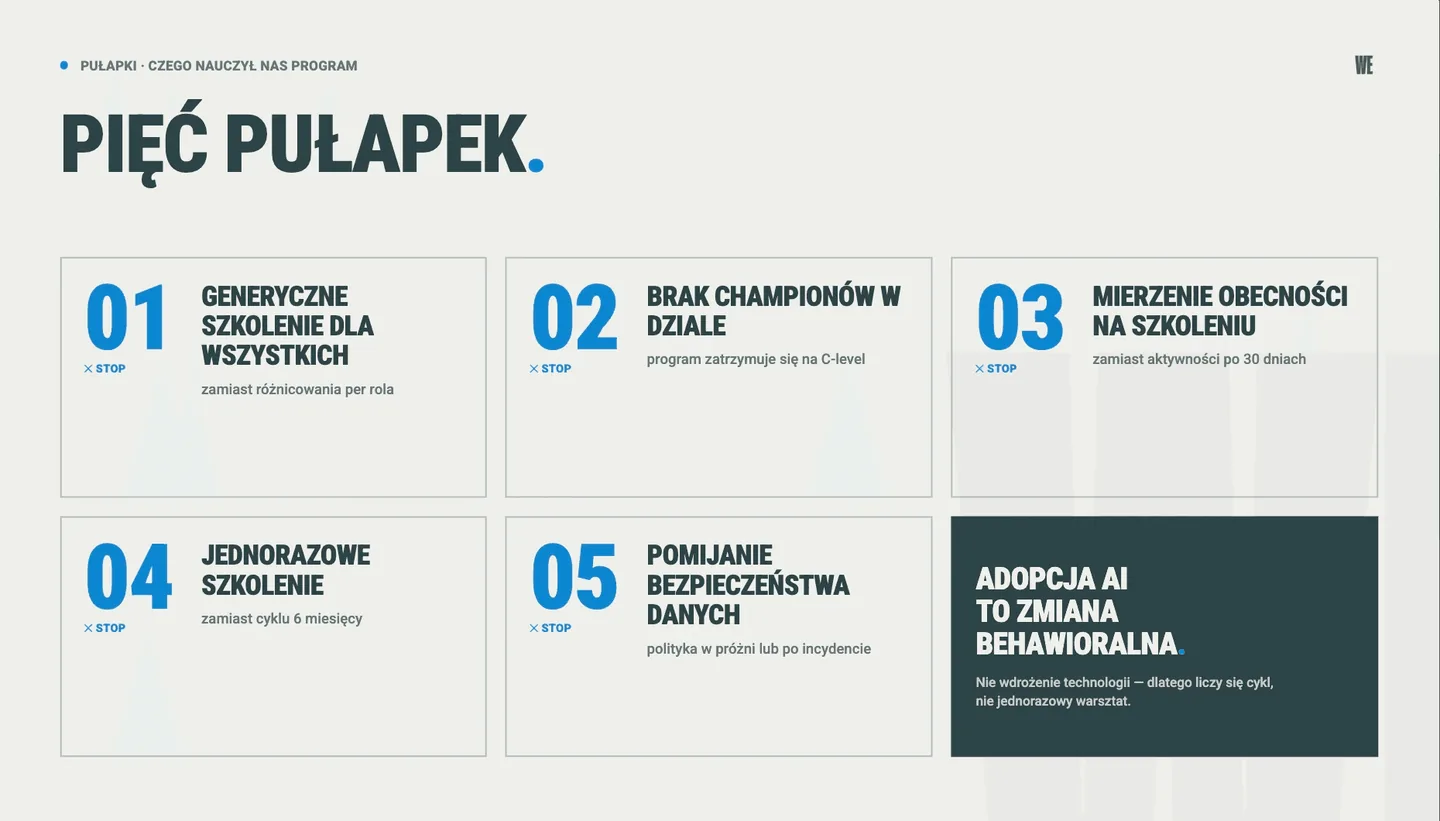
Trap 1: A generic training for everyone instead of differentiating by role
An employee of the legal department does not need the same exercises as a design engineer or a marketing specialist. A generic “how to use Claude” workshop gives participants the feeling that they received something that cannot be applied in their daily work. Our first phase was horizontal, but from the third phase we split the content into domain workshops: a different format for marketing, a different one for quality control, a different one for finance. First we built the base and a common language, now it is time for personalization.
Trap 2: No champions to base adoption on in a department
Without Ambassadors in every department the program stops at the C-level. An important refinement we learned along the way: from a certain point there should not be too many Ambassadors. From some departments we have 3-6 people. At the current stage one strong ambassador per department would be enough, plus a group of “advanced users” whom colleagues go to with questions. With 50 people it is easier to avoid taking responsibility for adoption: the program focuses mainly on developing individual skills, less on the role of change leaders. It is worth talking about leadership and change management already from the second phase (months 3-6). We start doing this in the third phase and we say so honestly.
Trap 3: Measuring attendance at training instead of activity after 30 days
A classic mistake in reporting AI transformation. The number of people at a workshop or a certificate from an e-learning platform says nothing about whether anyone uses the tool. We measure frequency, depth of use (own project, skill, automation), qualitative signals from Office Hours and 1:1 sessions, and organic requests from outside the program. We watch several dimensions in parallel, not attendance or a certificate alone.
Trap 4: A one-off training instead of a six-month cycle
Two weeks after a workshop most participants return to old habits, usually despite sincere intentions and enthusiasm for change. Weekly AI Office Hours, challenges, summaries, 1:1 sessions, allocating time for AI in the calendar: mechanisms that make AI an everyday element of the organization’s life. Every week of adoption is key: if systematic effort is missing, it is hard to get back on track.
Trap 5: Skipping the data security and compliance layer
An AI policy written before people start working with the tool falls into a void. A policy after an incident with data that was pasted in is reactive and painful. We worked out a middle path: the policy was created in the activation phase, when the first concrete questions started to appear.
It is worth adding that the most frequently cited barrier to AI implementations in Polish companies is concerns about data security (CRN - concerns about data security as the main barrier to AI implementations).
When it is not worth investing in a Claude adoption program
Claude is not always the best solution, either for a company at all or at the moment the company is currently in.
Problem 1: No paid Claude Team or Enterprise licenses
The free version of Claude allows Anthropic’s models to be trained on the data put into it, has heavy usage limits and does not allow sharing projects or skills inside the organization. If the company stays on individual plans, every ambassador building their own tool stops at the point “I ran out of my limit after 15 minutes of work” or “I have it on my side, but I cannot share it with a colleague”. We saw this here too: several people used free plans, with consequences in the form of limited analyses, failed team projects and frustration.
Problem 2: Very small teams
For a smaller organization it is simpler to point key people to Claude Pro or ChatGPT Plus and a one-day workshop. A full ambassador program makes sense only at a scale where you cannot talk to every employee individually, roughly where management stops knowing every person in the company by name.
Problem 3: No sponsor on the board who uses the tool personally
The strongest authority in an adoption program does not come from an email saying “from today we use AI”. It comes from the fact that a person at the top uses Claude daily and sees value in it. Where the board treats AI as “an initiative for employees, but not for us”, the program does not even lose ground: it never gains the proper seriousness.
Problem 4: Expecting an effect in a day/week/month
This is a behavioral change, not a technology implementation. It requires at least six weeks of regular contact with the tool, and full operational readiness of the team (with personalization and the first automations) is a horizon of a dozen or so weeks. Attempts to shorten it end in a rush of novelty that drops to zero after the first month of ordinary work.
What next: from adopting one tool to an AI strategy in the company
Adopting Claude is not the end goal of AI transformation. It is a stage that builds the foundation for the next steps, visible and written into the organization’s development plan.
Direction 1: Scaling personal solutions to departmental tools
A style skill for creating docs built by one person becomes the standard for the whole department. A project on specialist knowledge becomes the single source of truth for the whole team of specialists. An application that generates protocols becomes the work standard for current and new employees. Thanks to scalability and cooperation, value grows exponentially across the whole organization.
Direction 2: Integration with company systems
Without connectors to the tools used every day, many Claude uses work in isolation from the daily infrastructure. This is, however, a complex topic, above all because of data security and the AI use policy.
Direction 3: Building your own AI agents
This is the moment of moving from “AI Enabled” to “AI-First” in our maturity model. An employee does not only use Claude but has autonomous tools working on their behalf: a quoting agent, an internal assistant, a documentation agent. At this client, the quoting agent and the knowledge assistant in Teams now run in production, and the product database is at the MVP stage. See how we build such assistants and agents on Claude for other companies.
Meanwhile, what distinguishes an AI agent from ordinary AI automation, and when each is worth implementing, we break down in a separate post.
Adopting Claude is part of a broader strategy. Without it, the next steps (departmental skills, integrations, autonomous agents) have no cultural and competence foundation on which they can grow.
Did you buy Claude licenses in your company, but adoption is low? Let us talk about a program that brings your employees into productive, daily use: 30 minutes, no further obligations.
Frequently asked questions about Claude adoption in a company
How much does Claude Team or Enterprise cost for a company with about 150 users?
The Claude Team plan currently costs a few dozen dollars a month per user, with a minimum number of seats and discounts on annual purchases. Claude Enterprise is individually priced, with extended administrative controls, longer context windows and higher limits. It is worth discussing the exact calculation with Anthropic or an implementation partner, because the ranges change depending on configuration and region. We compiled the full comparison in the post Claude for business - Team, Max or Enterprise.
Is Claude compliant with the Artificial Intelligence Act and GDPR?
On the Team and Enterprise plans Claude does not use customer data to train models, and data is stored in line with the GDPR framework. The Artificial Intelligence Act comes into full force in 2027 and classifies AI systems by risk category. Most Claude uses in supporting office work do not qualify as a high-risk system. The line starts where an AI agent makes decisions without human supervision.
Claude or ChatGPT Enterprise: which to choose for the legal department, quality control and R&D?
In short: for long documents, contracts and work requiring deep reasoning, Claude. For fast, transactional queries and the Microsoft ecosystem, Copilot. ChatGPT is good for very small companies or teams. In practice every case is different and requires an individual approach. The decision should come from mapping specific tasks in departments, not from a generic comparison of benchmarks.
How long does a Claude adoption program take in a mid-sized organization?
From our experience: the foundation phase takes 12-14 weeks, the activation phase 8-10 weeks, the deepening and scaling phase another 8-10 weeks. In total six to nine months to the point where most trained employees actively use the tool and the changes introduced become everyday practice.
Can Claude be scaled to a whole company of 1000+ people?
Yes, but scaling is not just handing out licenses. It is repeating the same adoption program in further layers. We see two models: a central program run by an AI competence department (Center of Excellence), or a “cascade” model in which Ambassadors from the first phase train the ambassadors of the second phase. The choice depends on culture, skills and employee availability.
What training is needed before starting a Claude adoption program?
Three layers. For the board: a strategic workshop showing the value and risks of AI transformation. For Ambassadors: a practical workshop with idea mapping and building projects, skills and automations, with exercises embedded in daily work, not theory. For the whole organization: access to an education platform with modules on prompting, critical evaluation of AI results and the data policy. Then departmental training. Without the third layer the ambassador program becomes elitist and cut off from the rest of the company.
See also: AI training for business: a complete guide (2026), covering where in the organization to start, which programs to choose, how much it costs and when it is not worth it.
This case is one element of a larger puzzle. How to put together an organized portfolio of AI implementations we describe in a separate guide.
Sources:
PARP / Jagiellonian University - Artificial Intelligence in Companies (2026)
CRN - concerns about security as the main barrier to AI implementations
