
We have trained teams from several dozen Polish and international companies. Our main observation: organizations that bet on exercises embedded in daily work build a habit. Those that stop at theory and plain prompting lose momentum. The difference is not in people’s motivation or the quality of the tools. It is in the method of learning.
In this article: 8 types of exercises that build AI skills in office employees, based on hundreds of hours of B2B training.
Why most AI training does not bring results
The problem is in the approach to learning. We see it in companies that come to us after failed attempts at implementing AI, from manufacturing, through finance, to retail. The pattern is always the same: the company buys a training, employees watch a presentation on what artificial intelligence is, get a login to the tool and… that is it. After two weeks most go back to old habits.
Why? Knowing what AI is is not enough. It is like teaching someone to swim through lectures on hydrodynamics. You can know the theory perfectly and drown on the first entry into the water.
We see three reasons why AI training fails:
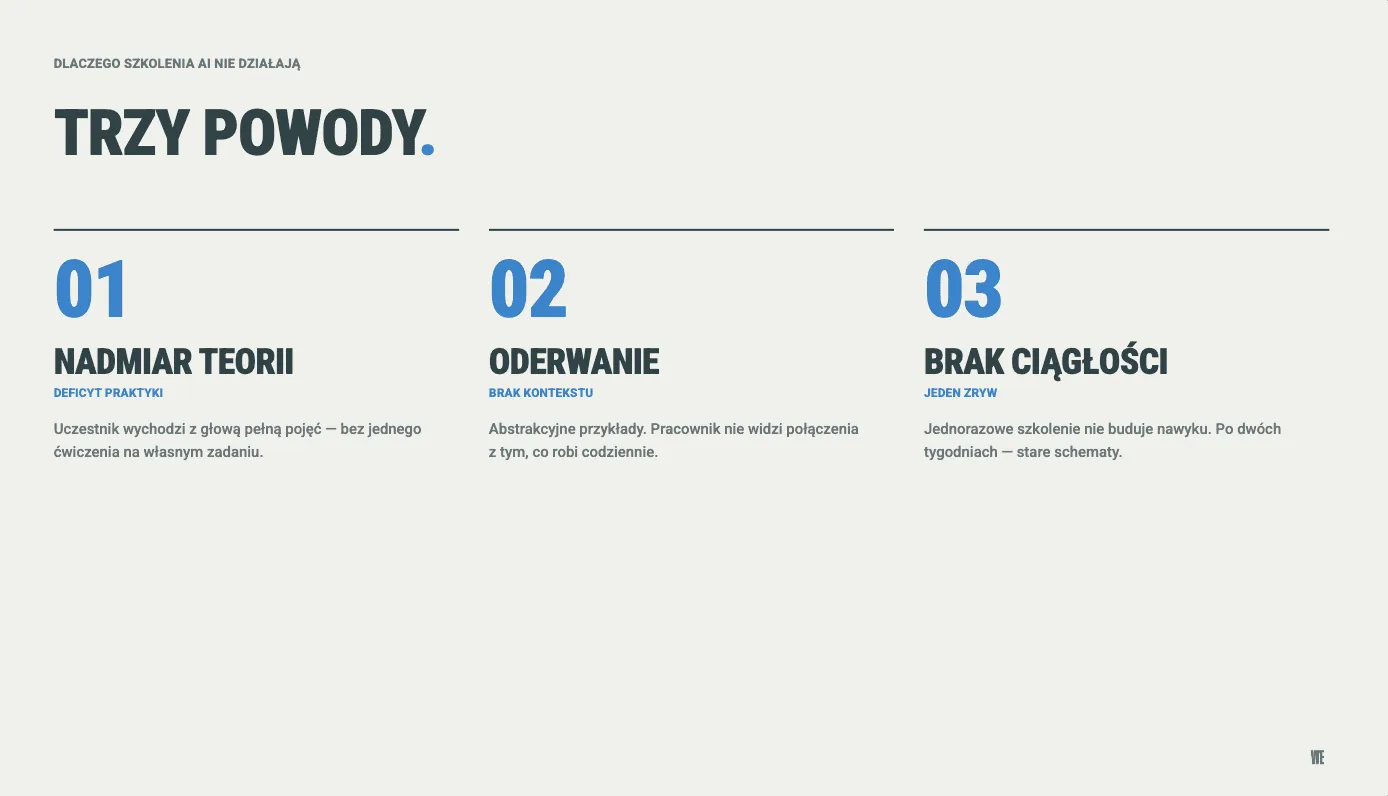
Too much theory, too little practice. The participant leaves the training with a head full of concepts, but without a single exercise done on their own task.
Detachment from reality. Training examples are abstract, so the employee does not see the link between what they heard and what they do every day.
No follow-up. A one-off training does not build a habit. A person needs repeated exercises and regular contact with the tool.
Effective AI learning requires three things at once: practice on tasks from work, gradually building complexity and a habit of reaching for AI tools every day. This cannot be achieved by watching a presentation for two hours.
An example from our experience: in a company from the window and door manufacturing industry, the completion rate of the training program was 92%. The reason? Exercises based on tasks that people actually do at work, not abstract textbook examples.
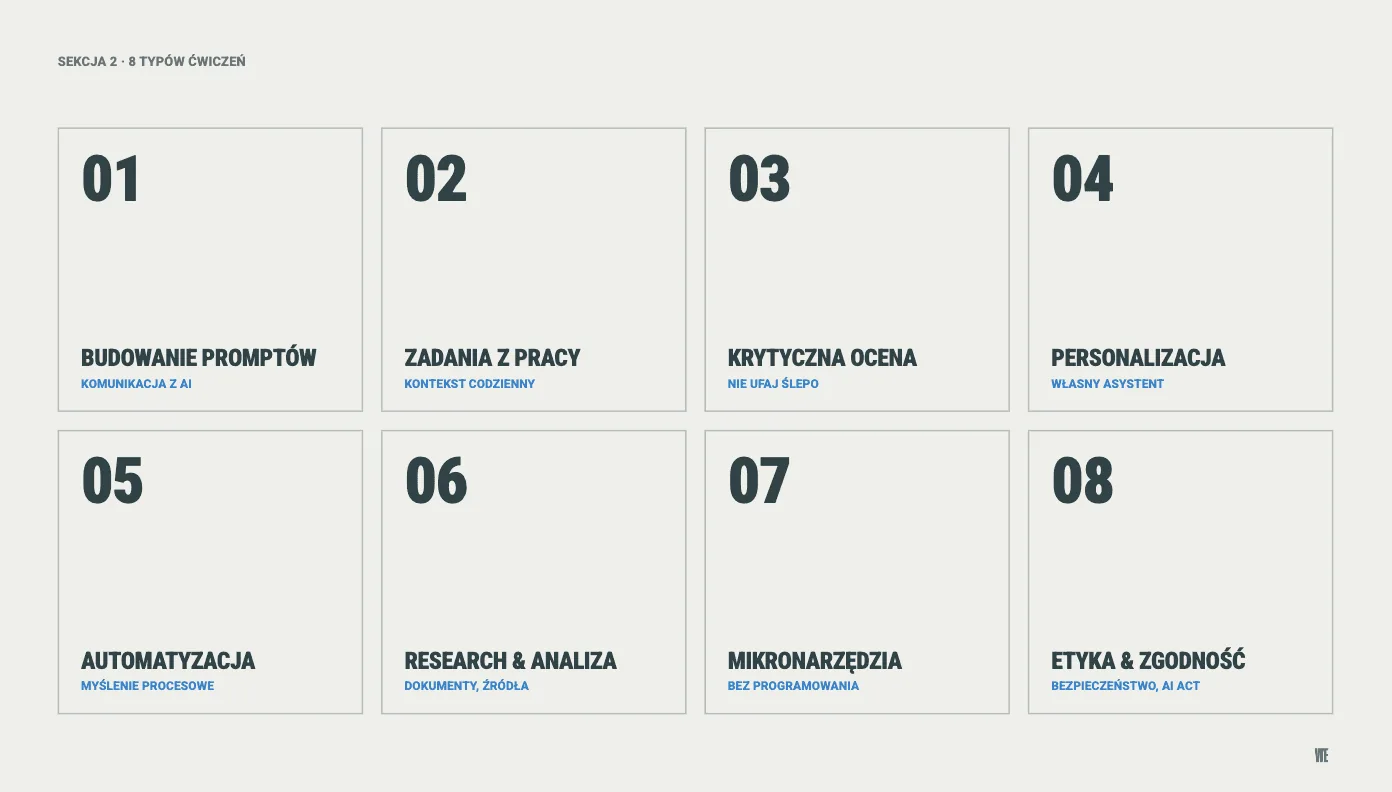
8 types of exercises that teach how to use AI
Based on hundreds of trainings delivered and more than 9 hours of practical material on our education platform we have identified 8 categories of exercises that give the best results. Each answers a different development need, from the basics of communicating with AI to building your own tools.
1. Building prompts: from a simple question to a full structure
Writing prompts is today one of the more important skills in working with AI. Not programming, not data analysis, but the ability to communicate precisely with the tool. It is the foundation without which the other skills make no sense.
The most effective method we have worked out is a three-step approach: the participant does the same task three times. First they write a quick, intuitive prompt. Then they add context and details. Finally they apply a full structure, with an assigned role, goal, format and tone of response. Comparing the three results is the moment when the participant sees the difference with their own eyes.
In practice we teach five techniques: quick questions without examples, giving model answers as a template, forcing step-by-step analysis, asking AI to write the optimal prompt for us, and gradually refining answers in a dialogue. Each has a different use and each is needed.
2. Tasks from daily work: contextual learning
This is the strongest differentiator of effective AI training. Not abstract examples (“write a poem about a cat”), but concrete tasks that the participant does in their daily work.
In our programs participants write emails to demanding clients, prepare reports from sales data, plan team meetings, create agendas and hand over tasks before vacation. We also teach how to use AI to analyze large data sets, create consistent presentations in a few prompts, and build automations with the help of no-code tools or Claude Code. Each exercise is embedded in a business scenario, because that is where AI gives the most value.
The effect is immediate. The participant sees that the same task that takes them 45 minutes by hand, they do in 10 with the help of AI. And what matters more, the quality of the result is comparable or higher. This experience changes the approach to work, not only for the duration of the training.
The lack of this skill is the most common cause of AI problems in companies. We see it regularly: an employee gets an answer from AI that sounds professional and convincing, so they copy it without verification. AI can generate content that looks correct but contains factual errors, outdated data or made-up facts (so-called hallucinations).
In our trainings we use exercises in which the participant receives an AI answer with deliberately planted errors and must identify them. We also teach the reverse approach: asking AI to audit your own work. This two-way practice builds a habit of critical thinking, which is the foundation of responsible use of artificial intelligence.
The rule is simple: AI is an assistant, not an oracle. Final responsibility for the result always lies with the human.
4. Personalizing and configuring AI tools
Most people use AI tools “out of the box”: they open a chat window, ask a question, get an answer. It is like using a smartphone only to make calls. The change starts the moment the employee configures the tool for themselves.
In our programs participants go through the full personalization path: from personal account settings, through creating dedicated assistants for specific tasks, to building their own knowledge bases. A sales employee creates an assistant that knows the company’s offer. A marketing specialist builds a tool that writes posts in her tone of communication. An accountant configures an assistant that knows Polish tax regulations.
By building their own assistant, the participant also learns to design system instructions, the logic of how language models work and knowledge management. And at the end they get a tool that saves them time every day.
This type of exercise changes the way of thinking about work. Before an employee automates anything, they must be able to describe the process step by step. It sounds trivial, but in practice it is one of the hardest tasks. Most people do daily processes intuitively, without being able to put them into words.
Our path leads the participant from algorithmizing a process (breaking a task into steps), through creating flowcharts with the help of AI, to designing a ready automation in tools that do not require programming. It is a chain of exercises in which each step builds on the previous one.
The result? An employee who has never heard of automation can, after a few hours, design a workflow that collects data from emails by itself, organizes it in a spreadsheet and sends a notification to the team. Without writing a line of code.
6. Deep research and document analysis
Office employees spend several hours a day searching for, reading and processing information. Deep research modes, available today in every leading AI tool, can cut this time by as much as a quarter. On one condition: you have to know how to use them.
In our exercises participants formulate complex analytical queries, ask AI to prepare reports from many sources, analyze long company documents and create weekly industry scans. A key element is learning to verify sources. AI can give nonexistent references, so the habit of checking is mandatory.
This is the skill with the fastest return on investment. Practically every office employee can apply it from the first day after the training.
7. Building micro-tools and prototypes: without programming
This type of exercise generates the most enthusiasm in our trainings. A participant who has never written a line of code creates, in a dozen or so minutes, a working PoC in Lovable or Claude Code, an interactive dashboard with data or a timer for managing work time. All in a chat window, without any software.
Modern AI tools generate complete, working applications from a description in natural language. Building working artifacts gives immediate satisfaction and deepens understanding of what AI can and cannot do.
This exercise changes the mindset. The employee stops thinking “I need IT to do this” and starts thinking “I can build this myself, in 15 minutes”. At the scale of an organization this change opens a new level of team independence.
8. Ethics, security and regulatory compliance
The EU regulation on artificial intelligence is coming into full force. We described the details in the article on postponing the AI Act requirements to December 2027. Every organization that uses AI tools must make sure its employees know the rules of safe and legal use.
In our trainings this is not dry theory of regulations. We use situational scenarios: the participant gets a situation from work and must decide: can I paste this data into AI? Can I publish a text generated by the model? How do I anonymize correspondence before sending it to an AI tool? The exercises also include classifying AI systems by risk category and a regulatory compliance audit.
This is not a “nice extra” to the training. It is an obligation. An employee who does not know the rules of data anonymization or copyright in the context of AI exposes the company to concrete legal and financial risk. If you want to check where your organization stands with AI, including rules and risk, we have a free AI Check: 20 questions, about 7 minutes, full results without email. It is an assessment of AI maturity, not an AI Act compliance audit.
What most AI training on the market is missing
Eight types of exercises are the foundation. There are four additional formats that raise the effectiveness of learning to the next level, and that we rarely see in training offers on the Polish market.
Simulations and role-play with AI
AI in the role of a difficult client, a demanding boss or a partner for price negotiations. The participant practices soft skills in a safe environment where they can make mistakes without consequences. One of the most effective methods of building confidence in working with technology.
Comparison exercises: the same prompt, different tools
Every AI tool has its own specifics. Sending an identical instruction to three different systems and comparing the results teaches a critical approach and helps choose the best tool for a specific type of task. In our materials we cover many tools, and the structured comparison is an area we are actively developing.
Co-creating content with AI in real time
Not “write me a text”, but “let us write together”. An approach in which a human and AI work in parallel on the same document, editing, commenting, expanding fragments. This builds a habit of treating AI as a partner in work, not as a machine for generating content.
Knowledge-sharing sessions in the team
The biggest mistake in learning AI is learning alone. Regular meetings at which employees share their discoveries (the best prompts, non-obvious uses, mistakes made) speed up the whole team’s learning many times over. This element goes beyond the training platform, but it is key to building an AI culture in the organization.
Where to start learning AI in a company: 6 steps
Based on several dozen implementations in Polish companies we have worked out a path that works regardless of industry and organization size. We have tested it in manufacturing, trading, service and office companies, from a dozen to several hundred employees.
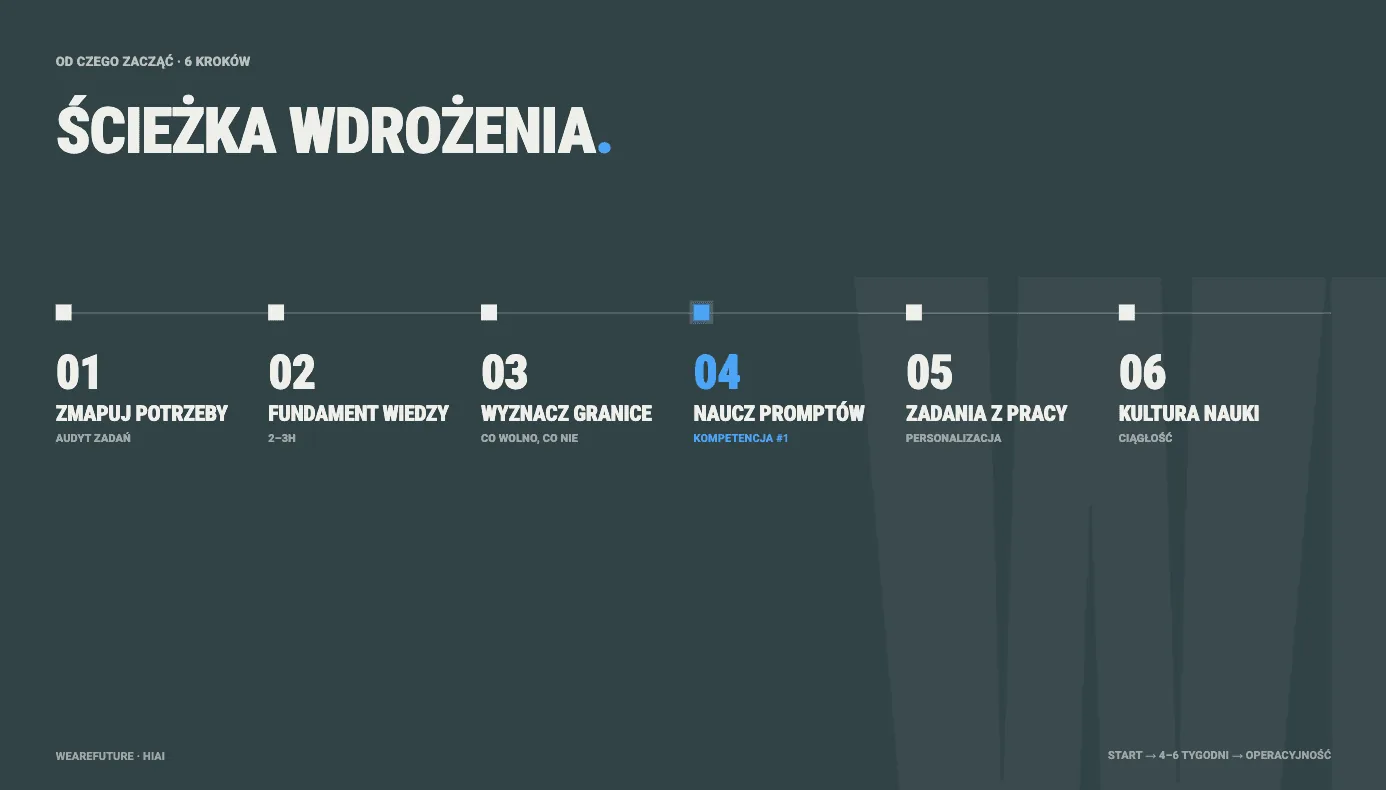
Step 1: Map the teams’ needs
Before you open any AI tool, gather information on what daily work really looks like in individual teams. Which tasks are repetitive? What takes a disproportionate amount of time? What do people do mechanically, without thinking? These are exactly the processes that are the best candidates for improvement with the help of AI.
Step 2: Build a foundation of knowledge
Start with the basics: what artificial intelligence is, how language models work, what their capabilities and limitations are. Without this foundation employees either overestimate AI (and get disappointed) or underestimate it (and ignore it). Material for 2-3 hours, no more. It is important that this part does not turn into an academic lecture. People need accessible language and concrete examples.
If you are looking for ready material for this foundation, see the free AI courses in the Knowledge Zone of the Polish Development Fund (PFR), which we deliver as a subject-matter partner.
Step 3: Set the boundaries: what is allowed and what is not
A step that many organizations skip and then pay a high price for. A phenomenon we see more and more often is uncontrolled use of AI by employees: pasting confidential customer data into public tools, sending internal financial documents, copying correspondence without anonymization.
Before an employee starts using AI every day, they must know: what data can I enter, and what am I not allowed to share? Which tools are approved by the company? How do I anonymize information before pasting it into a chat window? These rules should be clear, simple and communicated before practical exercises start, not after the fact, when sensitive data has already left the organization.
Step 4: Teach prompt writing
Skill number one. An investment of a few hours in learning structured communication with AI pays back in the first week of work. The three-step method we described above works best. The key is that the participant sees right away the difference in the quality of results between a simple and an elaborate prompt.
Step 5: Move to tasks from work, personalize, automate
Move learning to the ground of daily work as quickly as possible, ideally to the tasks you mapped in step one. Every participant should, within the first week after the training, apply AI to at least three tasks from their role. Once the basics settle in, it is time to configure the tools for yourself and the first automations.
Building your own AI assistant that knows the specifics of the role is a breakthrough: we turn a general-purpose tool into a personalized partner in daily work.
Step 6: Build a culture of continuous learning
AI changes every few weeks. New features, new tools, new possibilities. The organization must have a system of continuous development: regular knowledge updates, sessions for sharing discoveries, AI ambassadors in teams. In the companies we have worked with the longest, we see that this step makes the biggest difference: not the training itself, but what happens after it, decides the success of the transformation.
10 rules of effective AI learning
The essence of our experience with nearly a thousand program participants. These rules work regardless of industry, role and technical level, from an executive assistant to an operations director.
Writing prompts is skill number one. Without it the other skills make no sense.
Learn on your own tasks, not abstract examples. The closer to daily work, the better.
Before you start, know the boundaries. Know what data you must not paste into AI tools, how to anonymize information and which tools are approved in your organization.
Be critical of AI’s answers. Treat them as a starting point, not a finished result.
Build your own AI assistant, tailored to your role, tasks and style of work.
Think in processes. Break tasks into steps. Without that you will not describe a process precisely enough for AI to help.
Build your own tools, even without programming skills. The entry threshold is very low today.
Practice simulations and role-play. AI is a good partner for training soft skills.
Learn the regulations. The EU AI regulation is not a distant future. It is the present, and it concerns every employee.
Share knowledge with others. Learning alone is many times slower than learning in a team.
Frequently asked questions about learning AI
Can you learn AI without programming skills?
Yes. All 8 types of exercises we described are designed for people without a technical background. Modern AI tools communicate in natural language, so it is enough to be able to phrase instructions precisely. Programming is needed neither for writing prompts, nor for building micro-tools, nor for process automation.
How much time does it take to train a team in AI?
Based on our implementations, the organizational foundation (basics, prompt writing, first tasks embedded in company processes) takes 6-10 hours spread over 2-3 weeks. Full operational readiness of the team, including tool personalization and the first automations, requires regular work over 4-6 weeks.
The key is not speed but consistency: short, regular practice sessions give more lasting effects than a one-off burst. That is why in our programs we stretch learning over time and build it around tasks that teams do every day.
Which AI skills are the most important in 2026?
From the perspective of an office employee, three skills dominate: writing effective prompts (communication with AI), critical evaluation of results (verification and responsibility) and process thinking (the ability to break tasks into steps that AI can automate). On top of that comes mandatory knowledge of security and regulatory compliance. In 2026 this is no longer an option but a requirement.
How to implement these methods in your organization
All the types of practical exercises described in this article are available on the Hi_AI platform, our own training program, which was built on hundreds of hours of experience in AI transformation with Polish and international companies.
The platform contains more than 9 hours of video material, several dozen practical exercises and a complete development path: from the basics of artificial intelligence, through tools and daily applications, to law and security. The program is aimed at office employees in every role and does not require technical skills.
1000+ people trained · Several dozen companies · 9+ hours of practical material
If you are looking for a proven way to raise AI skills in your organization, let us talk. We help companies not only train employees, but build a culture of daily use of artificial intelligence.
Book a free consultation →
See also: AI training for companies: a complete guide (2026) - where in the organization to start, which programs to choose, how much it costs, when NOT to.
Learning tools is the first step. The next one is AI implementations in company processes.
